Beta Participant Guide

Procore Model Manager - Beta Access & Feedback

The Model Manager (Beta) tool is exclusively available to registered beta participants. It is not available through Procore Explore. To learn more, see Beta Participant Guide.

  • To access the beta and provide feedback Show/Hide Details

    • To register: Participating companies must sign the Procore Beta Agreement. Once signed, your Procore Administrator coordinates with your Procore point of contact to enable Model Manager (Beta) on specific Procore projects.

    • To Provide Feedback During Beta: Contact your dedicated Beta program lead.

    • To report issues: Report breaking changes to Procore Customer Support. For general feedback or non-critical issues, contact your Beta program lead or Procore point of contact.

  • Notice: Procore Beta Services & Documentation Show/Hide Details

    For information about Beta Services, see the Procore Subscription Services Agreement. This documentation supports a product currently in Beta; content is actively being developed for General Availability (GA) and may be incomplete.

    • As-Is Basis: Provided solely for evaluation purposes on an "as is" basis.

    • No Warranties: Standard contractual commitments do not apply. This information carries no formal product commitments, and Procore assumes no liability for harm arising from its use.

    • Subject to Change: Procore may change, discontinue, or choose not to generally release these Beta Services at any time without notice.


Currently, only Admin permissions are available. 'Read-Only' and 'Standard' permission levels are coming soon.

Welcome to the Beta Program. This guide introduces the Model Manager (Beta) tool, the central hub for your Building Information Modeling (BIM) workflow. Admins can use Model Manager (Beta) to federate 3D models, map 2D drawings for navigation and overlay, and curate saved views. Model data and saved views to simplify the accessibility and usefulness of the model for the larger project team.

Things to Consider

Prerequisites

Model Manager

The Model Manager (Beta) tool is located in Procore's project-level tool menu. The Admin view of the Dashboard is the main view and serves as the primary hub for 3D coordination.

To navigate to the project's Model Manager (Beta) tool Show / Hide Steps

  1. Log into the Procore web application.

  2. Open a Procore project.

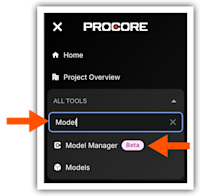
  3. In the All Tools menu, start typing: Model Manager

    Tip

    Don't see the Model Manager (Beta) in the Project Tools menu? See Why is the Model Manager tool not appearing in my Project Tools?

  4. Click the menu option in the All Tools list.
    This images shows the Project Tools menu in Procore with

    This launches the Model Manager (Beta) tool and takes you to its dashboard.

Key features include:

  • Conditioning: Federate and condition multidimensional project data in the Model Manager to configure optimized, field-ready views and streamline data retrieval.

  • Coordinating: Centralize issue tracking and shorten coordination cycles by placing persistent 3D pins directly on the model to resolve conflicts with shared locational context.

  • Connecting: Establish a continuous flow of data by linking 3D model objects directly to Procore execution tools, ensuring field decisions are grounded in a single, visual source of truth

Important Information for Model Manager (Beta) Participants

Procore is actively developing content for the General Availability (GA) launch of the Model Manager (Beta) tool. Please bookmark the pages below to retain access:

Important

Please do not share these links outside of the Beta program, as access is restricted to registered participants.


Windows is a registered trademark of Microsoft Corporation in the United States and other countries. Google Chrome, Android, and Google Play are trademarks of Google LLC. iPhone, iPad, and App Store are trademarks or service marks of Apple Inc., registered in the U.S. and other countries and regions. iOS is a trademark or registered trademark of Cisco in the U.S. and other countries and is used under license by Apple Inc. Autodesk, AutoCAD, Civil 3D, Navisworks, and Revit are registered trademarks or trademarks of Autodesk, Inc., and/or its subsidiaries and/or affiliates in the USA and other countries. All other trademarks are the property of their respective owners.