Overview
背景
由于以数字方式共享文档和通信的方式如此之多,想要为项目保持清晰的通信记录可能很困难。在 Procore 之外手动添加和通过电子邮件发送文档会增加引用过时修订的风险,并且很难在需要时找到和参考通信。
Procore 的通信工具是共享项目文档和维护正式通信记录的中心位置。文档管理文件可以直接从 Web 或移动式,可轻松访问文档以及清晰的通信历史记录。
这个怎么运作
当需要分发或讨论与文档相关的任何内容时,可以使用 Procore 的通信工具,从文档管理工具添加和共享文档。例如,你可以为传输记录创建通信 类型以共享已批准的图纸包。
通过通信项共享文档有助于确保通过 Procore 保留正式的记录系统。附加的文件(非副本)直接从文档管理工具链接,这意味着会保留文档的完整历史记录、上下文和权限。
视频
最佳实践
在为项目配置通信模板之前,请考虑以下事项:
你的项目团队需要有关施工文件的哪些类型的正式通信,他们可能需要何时发布?
你是否熟悉通信工具?如果是,你现在如何使用它,一旦开始使用文档管理工具,这种情况会如何改变?
谁应该发送和管理通信?
考虑通信工具所需的权限:项的通信 类型的"标准"级别权限或更高级别权限。或者项通信 类型的"只读"级别权限,并在权限模板上启用"创建项"细分权限。
让我们以 M 的 Mechanical 来看,这是一家机械分包商,已成功获得机械施工图包的批准。将这些信息分发给现场团队对他们来说至关重要。这可确保所有项目成员都充分了解最新发布的图纸,并且可以使用最新的计划集。
为完成此操作,M's Mechanical 将在公司级别管理员工具中创建一个新的通信 类型用于传输。输入详细信息后,他们会将此通信 类型分配给项目。
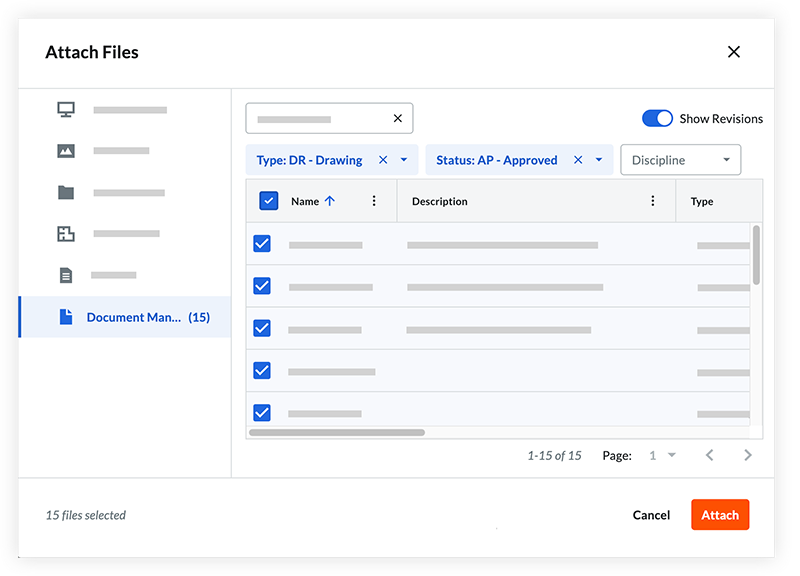
在通信工具中,他们将创建一个新的通信项并选择传输记录类型。他们将填写必要的信息并附上获批的机械施工图。
创建并发布通信后,这些新批准的图纸将立即通过电子邮件分发给每个具有适当文档管理权限的项目团队成员。例如,通信任务分配对象必须有权访问已批准的机械施工图才能访问附加的文档。