Delete Unused Segment Items
背景
在项目级别,可以根据公司的 Procore 管理员在创建细分时设置的策略删除细分和细分项(请参阅添加自定义细分)。与公司级别 WBS 中的细分项非常相似,项目级别细分项只有在未用于在项目上创建预算编号时才能删除。
在项目级别,可以根据公司的 Procore 管理员在创建细分时设置的策略删除细分和细分项(请参阅添加自定义细分)。与公司级别 WBS 中的细分项非常相似,项目级别细分项只有在未用于在项目上创建预算编号时才能删除。
Required User Permissions:
One of the following:
'Admin' level permissions on the Project level Admin tool.
'Read-Only' or 'Standard' level permissions on the Project level Admin tool with the 'Manage Segment Items' granular permission enabled on your permissions template. Note: Your Procore Administrator must configure additional settings for you to edit or delete a custom segment. To learn more, see the "Notes" in Admin: Manage WBS Codes.
其他信息:
细分项用于在项目上创建预算编号后,便无法将其删除。但是,可以将其停用以防止将来使用。请参阅停用细分项。
限制:
For customers using the Company level ERP Integrations tool
The default segments in WBS are compatible with Procore's ERP Integrations tool. However, some integrations do NOT yet support custom segments.
For customers who have independently developed or purchased a third-party solution to integrate with Procore
To take advantage of the custom segment capabilities associated with WBS, any existing API integrations that you have independently developed or purchased to interact with Procore must be updated to support Procore's new WBS API.
导航到项目级别管理员工具。
在"项目设置"下,点击工作分解结构链接。
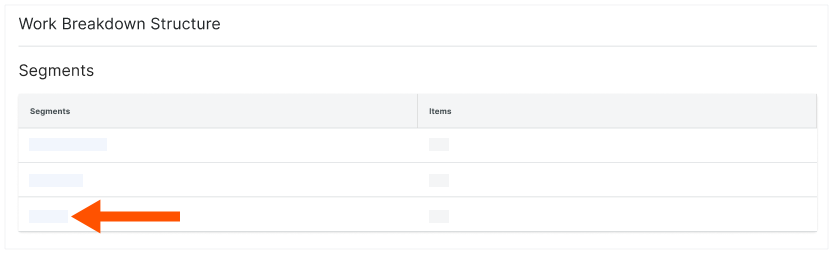
在"细分"表中,点击包含要删除的项的细分。
找到要删除的细分项。如果要删除分层细分,你需要导航到细分项并在左窗格中突出显示它。
点击细分项明细项上的垂直省略号,然后从 溢出 菜单中选择 删除 。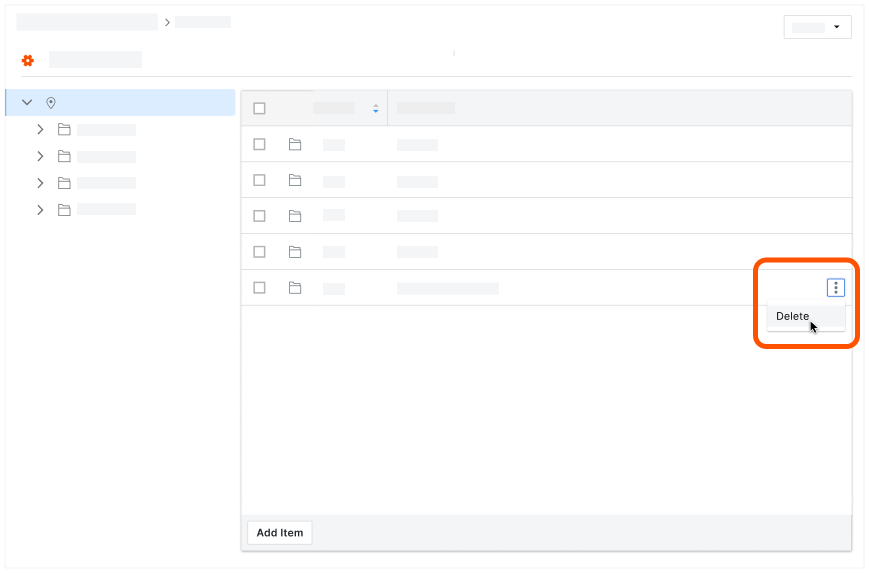 +1999
+1999