Edit Custom Segment Settings
背景
添加自定义细分后,你可以随时编辑其"细分名称"和"项目级别操作"设置。但是,你不得修改其"细分结构"设置。例如,你可以将细分名称从"Phase"更改为"Stage",并且可以打开/关闭项目级别设置,但是不能将分层细分更改为平面细分(反之亦然)。
需要考虑的事项
所需的用户权限:
公司级管理员工具的"管理员"级别权限。
其他信息:
创建细分后,无法编辑"细分结构"。例如,你不能将分层细分更改为平面细分,反之亦然。
你可以编辑这些设置的
:"细分名称"以及"项目级别操作"下的复选框。In Procore, a custom segment is a discrete category created for a company or project to breakdown your work into management components. Custom segments can be created in Procore's Work Breakdown Structure. Examples of custom segments your company or project team might want to create include:Area, Location, Phase, and so on.
你无法编辑以下项的设置
随时。In Procore, a segment is a discrete category that an organization uses to break down its work into manageable components. A default segment is one that is automatically provided for use with your Procore company account. Procore's WBS has two required default segments: cost code and cost type. It also has an optional default segment: sub job.
限制:
For customers using the Company level ERP Integrations tool
The default segments in WBS are compatible with Procore's ERP Integrations tool. However, some integrations do NOT yet support custom segments.For customers who have independently developed or purchased a third-party solution to integrate with Procore
To take advantage of the custom segment capabilities associated with WBS, any existing API integrations that you have independently developed or purchased to interact with Procore must be updated to support Procore's new WBS API.
ERP集成工具不支持自定义细分。
先决条件
步骤
导航到公司管理员工具。
在"公司设置"下,点击工作分解结构链接。
在"细分"表格中,点击你要使用的"细分"。
点击配置设置
 图标。
图标。编辑细分设置如下所示:
NotesYou can only edit segment settings for custom segments. You cannot edit settings for a default segment. See What is the difference between a default and custom segment in Procore's WBS?
When editing a custom segment:
You can only update the 'Segment Name' and its settings under 'Project Level Actions'.
You are NOT permitted to edit its 'Segment Structure'.
可选:细分名称。在现有名称上键入新名称。这是必填字段。
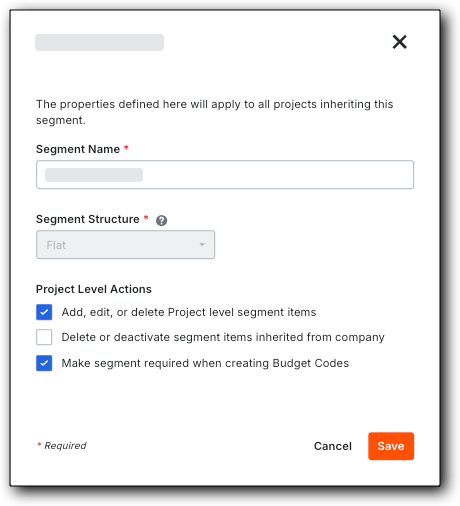

点击保存。"细分"列表会根据你的更改进行更新。
对公司所有要编辑设置的细分重复上述步骤。
你可以继续为公司的 Procore 账户配置预算编号结构。