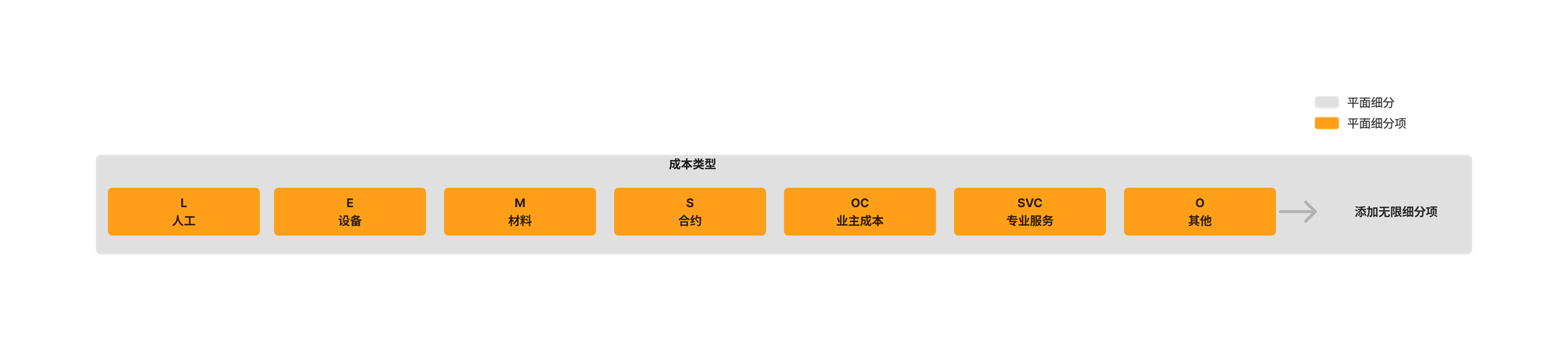
添加公司成本类型

背景

"成本类型"细分是 Procore 中的默认细分之一 。它是一个平面细分,通常用于执行 。在 WBS 中,细分是一个离散的类别,组织使用它来将其工作分解为可管理的组件。细分项是细分中的许多不同项之一。创建细分后,你可以向其中添加无限数量的细分项。要了解更多信息,请参阅什么是细分和细分项?

Example

Procore's 'Cost Type' segment includes the following segment items. See What are Procore's default cost types? Other segment items to add to your 'Cost Type' segment might include Direct Labor (DL), Direct Materials (DM), and Overhead (OH):

Diagram Wbs Flat Segment

需要考虑的事项

  • 所需的用户权限:

    • 公司级管理员工具的"管理员"级别权限。

  • 其他信息:

    • "编号"和"描述"是必填字段,不能为空。

    • 不允许"编号"字段中存在重复条目。每个细分项的"编号"字段中的条目都必须是唯一的。

    • "描述"字段中的条目没有字符限制。

    • 可以添加的细分项数量没有限制。

    • 无法在项目级别编辑或删除公司级别的"成本类型"细分项。

  • 限制:

    • For customers using the Company level ERP Integrations tool
      The default segments in WBS are compatible with Procore's ERP Integrations tool. However, some integrations do NOT yet support custom segments.

    • For customers who have independently developed or purchased a third-party solution to integrate with Procore
      To take advantage of the custom segment capabilities associated with WBS, any existing API integrations that you have independently developed or purchased to interact with Procore must be updated to support Procore's new WBS API.

先决条件

步骤

  1. 导航到公司级别管理员工具。

  2. 在"公司设置"下,点击工作分解结构链接。

  3. 在"细分"表中,点击"成本类型"细分将其打开。

  4. 执行以下操作:

    Wbs Add Segment Button

    • 如果是首次设置细分项,或者想要添加更多成本类型,请点击添加项按钮。

    • 编号。为细分项输入唯一字母数字编号。这是必填字段。不允许出现重复的条目。在本例中,我们将输入:L

    • 描述。输入细分项的描述。这是必填字段。在本例中,我们将输入:Labor

       Note

      The 'Code' and 'Description' fields are required. Duplicate entries are NOT permitted in the 'Code' field. If you attempt to leave a field blank or add a duplicate, Procore displays a RED banner to notify you of the issue.Wbs Cost Type Duplicate Empty Notice

  5. 对要添加的每种成本 类型重复上述步骤。