How does Procore automatically complete amounts on a main contract payment application? (Beta)
Procore can be configured to use terminology specific to main contractors, owners or specialty contractors. Learn how to apply the dictionary options.
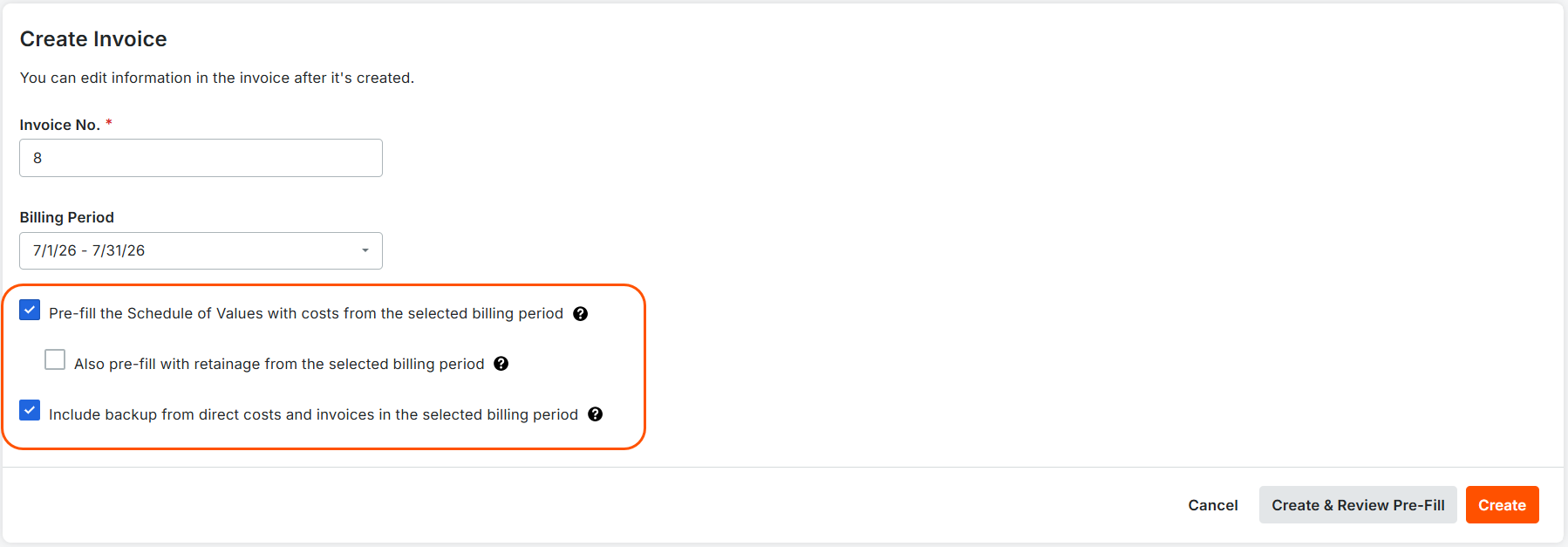
Mark one or more tickboxes to turn a prefill option ON when creating main contract payment applications in the main contract tool. These options allow Procore to automatically complete amounts on the main contract payment application using data from eligible budget code line items on subcontractor payment applications, direct costs and commitment variations in the approved statuses.
Prefill options are only available when creating main contract payment applications. Procore does not allow users to prefill payment applications after clicking Create.

This page details the Modernised experience. If your account is still using the legacy UI, please refer to the image below for the corresponding layout.
This table describes the prefill options for main contract payment applications.
Tickbox | Mark the tickbox to turn ON and... | Remove the tickbox to turn OFF... |
|---|---|---|
Pre-fill the bill of quantities with cost from the selected valuation period | Populate the line items in the bill of quantities with eligible costs from corresponding budget codes on Approved subcontractor payment applications, direct costs and commitment variations for the same valuation period as the main contract payment application. Notes:
| Procore does NOT populate the bill of quantities with cost. Users must manually enter the bill of quantities data. |
Also pre-fill with retention from the selected valuation period | This feature is only available when you turn on Populate the Bill of Quantities with cost from the selected valuation period. Populates the Work retention this period (£), Materials retention (£) and Total retention released (£) columns in the Bill of Quantities (BOQ) with calculated retention values from eligible subcontractor payment applications in the Approved status. Note:
| Procore does NOT populate the programme with calculated retention values from eligible subcontractor payment applications in the Approved status. |
Include backup from direct cost and payment applications in the selected valuation period | Populates the payment application's Attachments card with these sections: Uploaded attachments, Attachments from subcontractor payment applications and Attachments from direct costs. It also:
| Procore does NOT include a payment application backup. Instead, the payment application includes the Uploaded attachments card to add attachments. |
Loading related articles...