Un contact de facturation a-t-il besoin d’une invitation à facturer pour soumettre une facture ?
Réponse
Non. Un contact de facturation dispose de plusieurs options pour créer une facture.
Il existe deux façons de répondre à une « invitation à facturer » en tant que contact de facturation : (1) à partir de l’e-mail « Invitation à facturer » ou (2) à partir de l’outil Engagements au niveau projet du collaborateur en amont. Utilisez la deuxième option lorsque vous savez que vous disposez des autorisations de contact de facturation, mais que l’invitation à facturer est manquante ou perdue.
Lorsque vous répondez à une invitation, vous pouvez l’accepter ou la refuser comme suit :
Pour répondre à un e-mail « Invitation à facturer » : Afficher/Masquer
Ouvrez votre e-mail Boîte de réception.
Recherchez l’e-mail dont l’objet est « Nom du projet : le nom de l’utilisateur vous a invité à facturer ».
Ouvrez l’invitation à facturer.
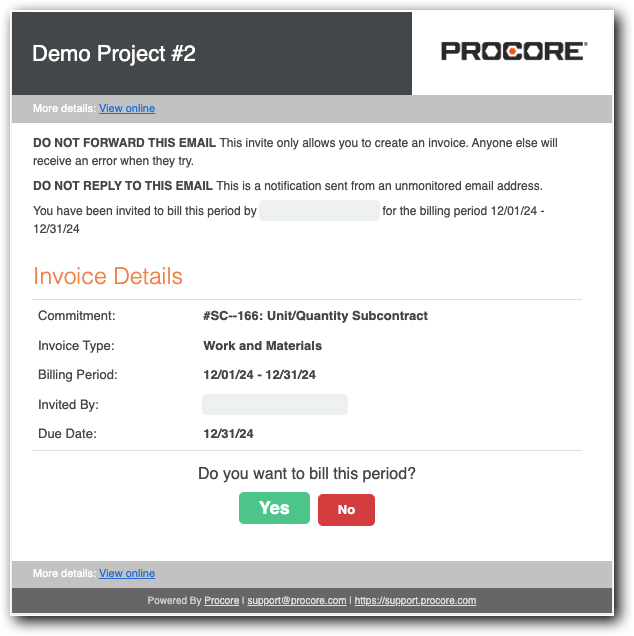
Vérifiez les détails de la facture :
engagement. Indique le numéro et le nom de l’engagement.
Type de facture. Indique le type de facture. Voir Configurer les paramètres : Facturation.
période de facturation. Plage de dates pour la période de facturation ouverte.
Invité par. Le nom et le prénom de l’expéditeur. En règle générale, il s’agit de l’administrateur des factures.
date d'échéance. La date à laquelle votre facture est due. Les contacts de facturation ne peuvent pas créer ou soumettre une facture dans le projet Procore après cette date.
Cliquez sur l’un de ces boutons pour répondre à la question Voulez-vous facturer cette période ? Invite :
Oui. Acceptez l’invitation et envoyez une facture. Le facture statut devient alors Accepté. Continuez avec les étapes de Soumettre une nouvelle facture en tant que contact de facturation.
Non. Refusez l’invitation si vous ne souhaitez pas soumettre de facture pour la période de facturation ouverte. Le facture statut devient alors Refusé.
Pour répondre à une « invitation à facturer » dans l’outil Engagements : Afficher/Masquer
Accédez à l’outil Engagements du projet.
Recherchez l’engagement auquel vous avez été ajouté en tant que contact de facturation.
Sous Voulez-vous facturer cette période ?, indiquez votre intention de soumettre une facture en cliquant sur le bouton Oui.

Cliquez sur le bouton Publier une réponse .
Vous ne trouvez pas votre invitation à facturer ou vous ne savez pas si une invitation a été envoyée ? Un contact de facturation dispose toujours des autorisations suffisantes pour créer une nouvelle facture pour une période de facturation ouverte dans le projet Procore du collaborateur en amont. Voir Créer une nouvelle facture en tant que contact de facturation.
Comment le rôle de contact de facturation est-il attribué aux utilisateurs ?
Pour ajouter un contact de facturation, un utilisateur autorisé de l’entreprise gérant l’engagement dans le projet Procore doit :
Ajoutez l’entreprise de contrat de sous-traitance à l’Annuaire des entreprises. L’entreprise sous-traitante correspond à « l’Entreprise sous-traitante » sur un engagement. Voir Ajouter un Entreprise au Entreprise Annuaire. L’utilisateur qui sera le contact de facturation doit être ajouté à l’entreprise. Voir Ajouter des utilisateurs à l’entreprise.
NotesOptionnel. Vous pouvez sélectionner un (1) utilisateur comme contact de facturation par défaut dans un enregistrement d’entreprise. Voir Ajouter une entreprise à l’annuaire de l’entreprise.