Quels sont les statuts par défaut des factures Procore ?
Réponse
Dans Procore, il existe deux types de factures : une facture ascendante et une facture descendante. Les deux peuvent être placés dans des statuts différents qui représentent un état particulier : de l’état d’ébauche à l’état soumis pour révision, en passant par l’état rejeté ou l’état approuvé pour paiement.
Pour en savoir plus, consultez les informations ci-dessous :
Factures en amont
Factures descendantes
Factures en amont
Le tableau ci-dessous détaille les différents statuts que vous verrez lors de la gestion de vos factures ascendantes. Dans Procore, les factures en amont comprennent :
Les factures EG/Client pour les outils Contrats clients et Facturation proportionnelle.
Les factures de financement pour les outils Financement et Facturation.
Les factures au maître d’ouvrage pour les outils Contrats principaux et Facturation.
Status | Descriptif |
|---|---|
Projet | La facture est actuellement à l’état d’Ébauche. |
En cours d’examen | La facture a été soumise à un administrateur des factures pour examen. |
Réviser et soumettre à nouveau | La facture a été rejetée comme soumise par un administrateur des factures. Le contact de facturation doit soumettre à nouveau la facture. Les coûts ne sont PAS reflétés dans le budget. |
Approuvé | La facture a été approuvée par un administrateur des factures. |
Factures descendantes
Les tableaux ci-dessous détaillent les différents statuts et les informations de statut supplémentaires disponibles pour vos factures descendantes. Si vous êtes un entrepreneur général ou un entrepreneur spécialisé, cela inclut les factures des sous-traitants qui sont facturées sur les engagements d’un projet. Si vous êtes un maître d’ouvrage, cela inclut les factures des sous-traitants qui sont facturées sur les engagements d’un projet.
Statuts
Informations supplémentaires sur l’état
Statuts
Le tableau ci-dessous répertorie les statuts disponibles et la signification de chacun d’entre eux. Le tableau indique également qui peut modifier certaines parties d’une facture lorsque celle-ci est dans un statut particulier. Il montre également comment le statut d’une facture affecte la capacité de Procore à refléter les coûts dans l’outil Budget du projet.
Status & Description | Who can edit the General Information card on an invoice? | Who can add attachments to an invoice? | Who can edit the Schedule of Values on an invoice? | Who can review SOV line items on an invoice? | Can send an invoice to the Procore + DocuSign integration? | Are costs reflected in the project's Budget tool? |
|---|---|---|---|---|---|---|
Draft 1 The invoice is currently in the 'Draft' state. |
|
|
|
| No | No |
Under Review A downstream invoice contact has submitted the invoice to the upstream invoice administrator for review. |
|
|
|
| No | No |
Revise & Resubmit 1The invoice has been returned to the downstream invoice contact by the upstream invoice administrator. |
|
|
|
| No | No |
Approved The invoice has been approved for payment by the upstream invoice administrator. |
|
|
|
| Yes | Yes 2 |
Approved as Noted The invoice has been approved for payment by the upstream invoice administrator with the noted exceptions. |
|
|
|
| Yes | Yes 2 |
Pending Owner Approval The invoice has been submitted by the upstream invoice administrator to the upstream project owner or funding source for review. |
|
|
|
| Yes | No |
1 Les utilisateurs disposant des autorisations appropriées peuvent supprimer les factures des sous-traitants dont le statut est « Ébauche » et « Réviser et renvoyer ». Voir Supprimer une facture de sous-traitant. Procore envoie également une notification par e-mail au contact de facturation lorsque le statut passe à « Réviser et soumettre à nouveau ».
2 Si la colonne « Coût du projet à ce jour » est incluse dans la vue du budget appliquée à vos données, les montants de la facture sont reflétés dans la colonne « Coûts du projet à ce jour ». Voir Quelles sont les vues du budget standard de Procore ? et Quelles sont les vues du budget standard de Procore pour Intégrations ERP ?
Informations supplémentaires sur l’état
Dans l’onglet Sous-traitant , vous verrez également des informations de statut supplémentaires reflétées dans les décomptes qui apparaissent en haut de l’outil Facturation du projet dans l’onglet Sous-traitant et/ou dans la colonne « Statut » du tableau des factures.
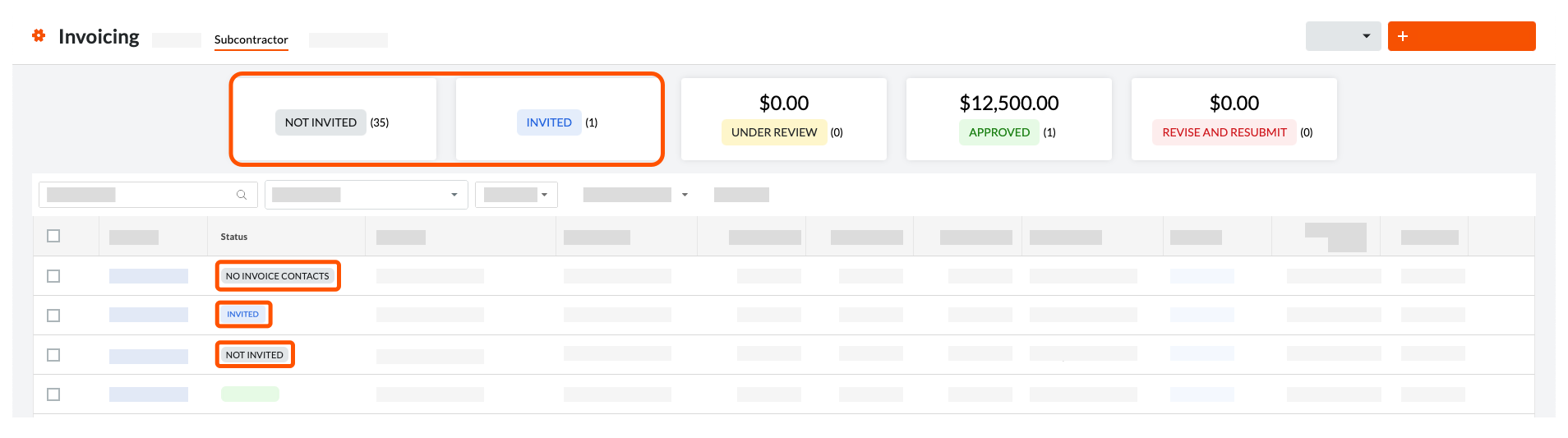
Informations supplémentaires sur l’état | Descriptif |
|---|---|
Invité(e) | Le contact de facturation a reçu une « invitation à facturer ». |
Aucun contacts de facturation | Un contact de facturation n’a PAS été affecté au contrat. |
VDCS non approuvés | Le Sous-traitant VDC (VDCS) n’a PAS été approuvé. |
Non invité | Le contact de facturation n’a PAS reçu d'« invitation à facturer ». |
Accepté | Le contact de facturation a accepté l’invitation à facturer, mais n’a pas encore créé la facture. |
Refusé | Le contact de facturation a décliné l’invitation à facturer. |
Voir aussi
Chargement des articles connexes...