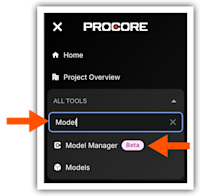
Navigate to the Model Manager Tool
Procore Model Manager - Beta Access & Feedback
The Model Manager (Beta) features and documentation are subject to change without notice.
To learn about the beta program, see the Beta Participant Guide.
The Model Manager (Beta) features and documentation are subject to change without notice.
To learn about the beta program, see the Beta Participant Guide.
Required User Permissions Currently, only Admin permissions are available. Procore will add more permission levels later.
Log into the Procore web application.
Open a Procore project.
In the All Tools menu, start typing: Model Manager
Click the menu option in the All Tools list. 
This launches the Model Manager (Beta) tool and takes you to its dashboard.