Unit quantity-based data entry
Learn how to bill for stored materials on payment applications when a contract is configured to use the 'unit quantity-based' accounting method.
Before data entry, the quantity in the New quantity column is set to 0 by default on the first payment application.
In this valuation period, the subcontractor installed 100 units. A payment application contact enters 100 in the New quantity column (see 1). Once input, Procore automatically update the highlighted values on the line item (see 2):

New value. Procore calculates this value by multiplying the New quantity amount by the unit price.
Total completed & stored to date (£). Procore update this value from £0.00% to £12,500.00.
Total completed & stored to date (%). Procore converts the entry to a percentage value (20%) to show total progress.
Balance to finish. Procore subtracts the sum of the New Value (£12,5000.00) from the Scheduled Value (£62,500.00). The £50,000.00 balance to finish shows the cumulative decline of the contracted amount.
Next, the quantity in the New materials stored (quantity) column is set to 0 by default on the first payment application. In this valuation period, 50 units were stored on the job site. A payment application contact enters 50 in the New materials stored (quantity) column. This is the quantity of the materials received and stored on-site. Once input, Procore automatically update the highlighted values on the line item (see 2):
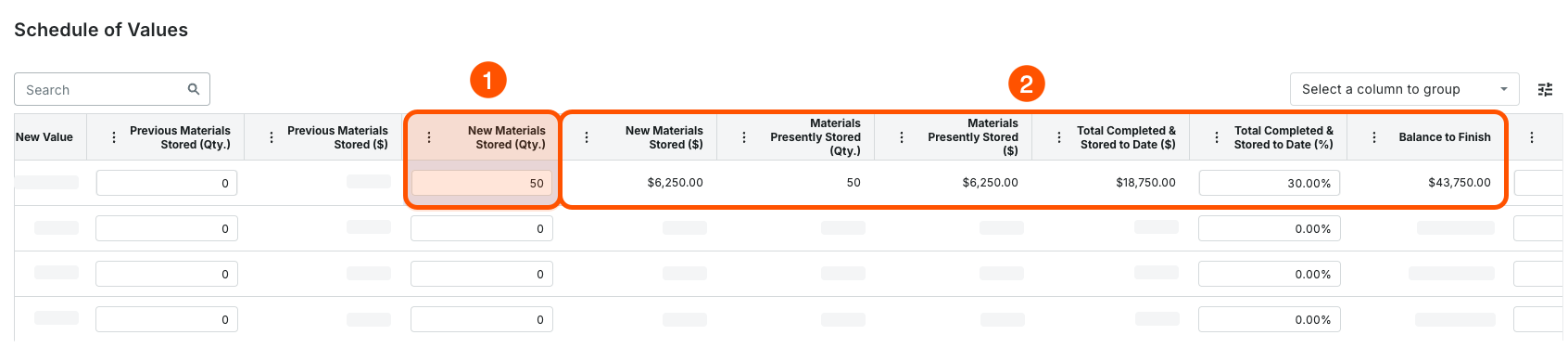
New materials stored (£). Procore calculates the New materials stored (quantity) entry by the unit price from the subcontract.
Materials presently stored (quantity). Procore updates this quantity from 0 to 50.
Materials presently stored (£). Procore converts the quantity (50) to a currency amount (£6,250.00).
Total completed & stored to date (£). Procore adds £6,250.00 to £12,500.00 and shows £18,750.00.
Total completed & stored to date (%). Procore converts the entry to a percentage value (30%).
Balance to finish. Procore subtracts the sum of the New Value (£12,5000.00) and the New materials stored (£) (£6,250.00) from the Scheduled value (£62,500.00) amount. £43,750.00 shows the cumulative decline of the contract amount.
For the next valuation period, the payment application contact prepares their second payment application. In all new payment applications, the new quantity is 0 by default (see 1). The Previous quantity shows the 'New quantity' submitted on the first payment application (see 2) and the Previous materials stored (quantity) shows the 'New materials stored (quantity)'from the previous payment application (see 3).
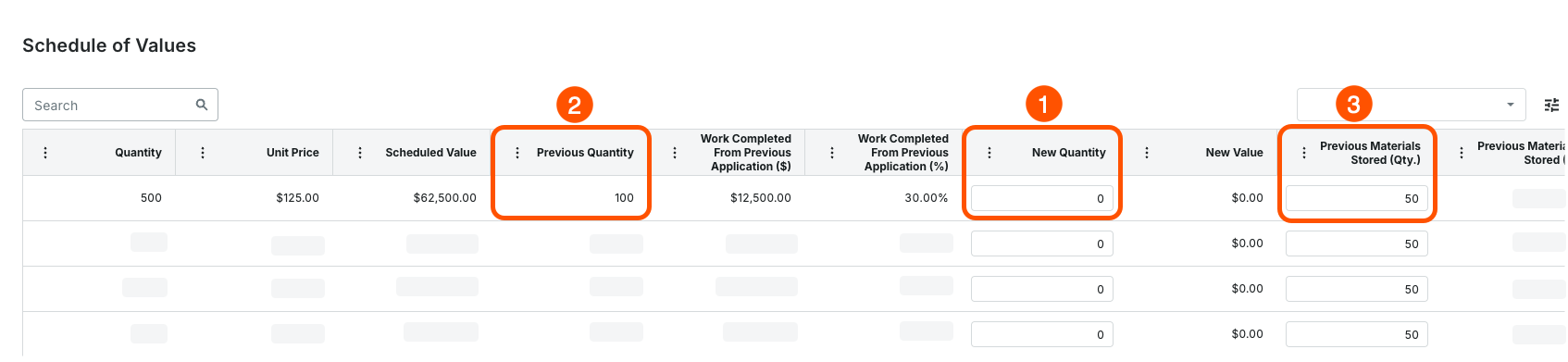
Next, perform some additional data entry on the line item.
In this example, the subcontractor installed the 50 units previously stored on the previous payment application. The payment application contact update the Previous materials stored (quantity) entry to 0 and moves that quantity (50) to the New quantity column (see 1). The subcontractor also received 100 additional units, placing them all into storage. The payment application contact enters 100 in the New materials stored (quantity) column (see 2).
Once input, Procore automatically update the highlighted values on the line item (see 3):

New value. Procore calculates this value by multiplying the New quantity amount by the unit price.
Previous Materials Stored (£). Procore calculates this value by multiplying the Previous Materials Stored (quantity) amount by the unit price.
New materials stored (£). Procore calculates the New materials stored (quantity) entry by the unit price from the subcontract.
Materials presently stored (quantity). Procore shows the quantity of the materials presently stored. Procore shows the New materials stored (quantity) because they installed all materials stored on the previous payment application.
Materials presently stored (£). Procore converts the quantity (100) to a currency amount (£12,500.00).
Total completed & stored to date (£). Procore adds the New Value (£6,250.00) from the new payment application, subtracts the Previous Materials Stored (£6,250.00) from the previous payment application and then adds the New Materials Stored (quantity)(£18,750.00) to calculate the £31,250.00 total.
Total completed & stored to date (%). Procore converts the Total Completed & Stored to Date (£) to a percentage value (50.00%).
Balance to finish. Procore subtracts the sum of the New value (£6,250.00) and the New materials stored (£) (£12,500.00) from the Scheduled value (£62,500.00) amount. £31,250.00 shows the cumulative decline of the contract amount.

