Change management with change events
Procore's change event tool was designed for any work project that can potentially result in an additional cost. With this tool, you create a change event that helps your team better understand the potential cost of a change, before it becomes an actual cost. After creating a change event, you can then use the tool to create an RFQ (request for quote), which is sent to the appropriate downstream collaborators for pricing.
After RFQs are created and your contractors respond with a quote, your team can also create variations that are based on the submitted quote. You can configure your variation workflow by setting the number of variation tiers: one, two or three tiers. More variation tiers make for a more complex workflow but provide an increased amount of control. See What are the different variation tier settings in Project Financials?
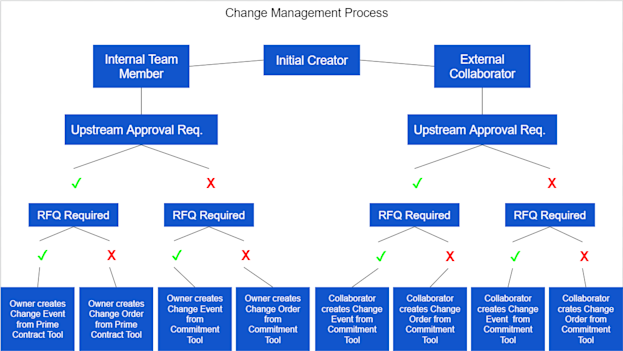
The sample image below shows you how a company might manage its change management process using the change event tool. Keep in mind that this image is just showing you the options you have when enabling the change event tools. If you would prefer to simply create variations, you do not have to enable the change event tool.
Learn More
To learn more about the change event tool, please read:
Create an RFQ (request for quote) to get a quote from subcontractors for pricing:
Review RFQ responses to review quotes that have been submitted from contractors to see if you want to create a variation from the RFQ:
You can create a commitment variation either before or after the RFQ has been responded to:
If the client contract, funding or main contract tool is enabled, you can create a potential variation either before or after the RFQ has been responded to:
For more information about the change event tool, see change event.