Qu’est-ce qu’une retenue manuelle sur une facture de sous-traitant ?

 General Availability in Select Markets (United States)

flag-us.png Procore Pay is available in the United States. It is designed for General Contractors and Owner-Builders who act as their own General Contractors on a job. Procore Pay extends the Invoice Management functionality in the Procore web application to handle the payment process between general and specialty contractors.

Fond

Lorsque vous utilisez Procore Pay pour envoyer des paiements, un payeur ou peut utiliser l’outil Paiements au niveau entreprise pour gérer les suspensions de paiement. Les administrateurs de factures peuvent gérer les retenues à l’aide des outils de gestion des factures au niveau projet.

Réponse

With Procore Pay, manual holds can be applied to payments for a variety of reasons. These include quality issues, such as when delivered work is subpar or warranty support is uncertain. Holds might also be applied for incomplete work, work not meeting the specified quality level, contract disputes, financial concerns, or compliance issues. Whatever your reason for applying a hold, Procore Pay users can apply these hold types on subcontractor invoices:

  • Invoice Holds. A , , , and users with 'Admin' level permissions on the Payments tool can create an invoice hold to alert users about a hold on a specific subcontractor invoice.

  • Vendor Holds. A or , can apply a vendor hold to an invoice to alert users to pause payments on all of the vendor's invoices.

When creating a hold, users can also choose to share the hold with an invoice contact. Users can also edit the details of a hold. Once the conditions are satisfied, users can release the hold.

Plus

De quelles autorisations avez-vous besoin pour gérer les retenues sur les factures des sous-traitants ?

Action

Designated Procore Pay Roles

Permissions Level on Procore Tools

Payments Admin 1

Payments Disburser 1

'Admin' on Payments 1

'Admin' on Commitments (Invoice Administrator)

'Read-Only' or 'Standard' on Commitments

Create an Invoice Hold

check_mark_32.png

check_mark_32.png

check_mark_32.png

check_mark_32.png

minus_32.png

Edit an Invoice Hold

check_mark_32.png

check_mark_32.png

check_mark_32.png

check_mark_32.png

minus_32.png

View an Invoice Hold

check_mark_32.png

check_mark_32.png

check_mark_32.png

check_mark_32.png

minus_32.png

Release an Invoice Hold

check_mark_32.png

check_mark_32.png

check_mark_32.png

check_mark_32.png

minus_32.png

Create a Vendor Hold

check_mark_32.png

check_mark_32.png

minus_32.png

minus_32.png

minus_32.png

Edit a Vendor Hold

check_mark_32.png

check_mark_32.png

minus_32.png

minus_32.png

minus_32.png

View a Vendor Hold

check_mark_32.png

check_mark_32.png

check_mark_32.png

check_mark_32.png

minus_32.png

Release a Vendor Hold

check_mark_32.png

check_mark_32.png

minus_32.png

minus_32.png

minus_32.png

Les retenues empêchent-elles les utilisateurs d’effectuer des paiements de factures ?

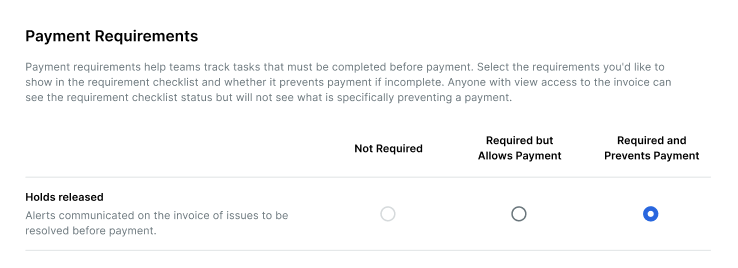
Uniquement si l’administrateur des paiements de votre entreprise configure le paramètre Blocages pour utiliser l’option Obligatoire et Empêche le paiement . Voir Configurer les exigences de paiement en tant que payeur.

Example

To prevent Procore Pay users from paying invoices, the Required and Prevents Payments option must turned ON for the Holds Released setting.holds-released-prevent-payments.png

Important! When the Required and Prevents Payment setting is turned ON, Procore Pay displays an alert banner on the affected subcontractor invoice(s). It also prevents users from creating disbursements until the hold is released. See Release a Manual Hold on an Invoice.

Combien de temps peut-on bloquer une facture de sous-traitant ?

Les utilisateurs disposant des autorisations utilisateur requises peuvent bloquer une facture de sous-traitant à tout moment. Les réservations peuvent également être levées à tout moment. Voir Créer et appliquer une retenue manuelle sur une facture.


Comment puis-je appliquer des retenues ?

Les utilisateurs de Procore Pay disposant des autorisations utilisateur requises peuvent créer et appliquer des suspensions. Pour savoir comment créer une nouvelle retenue, voir Créer et appliquer une retenue manuelle sur une facture.


Comment puis-je lever les suspensions ?

Pour savoir comment annuler une retenue sur une facture, voir Annuler une retenue manuelle sur une facture. Une fois qu’une suspension est levée, elle peut être réappliquée ultérieurement.


See Also

Loading related articles...