Ajouter des approbateurs de bénéficiaires
Accédez à l’outil Paiements au niveau entreprise.
Cliquez sur l’icône
 Paramètres de paiement. La page Paramètres de paiement s’ouvre. La page Comptes bancaires externes est active par défaut.
Cliquez sur l’onglet Traitement des paiements . Il s’agit de l’onglet actif par défaut.
Cliquez sur Autorisations de paiement.
Faites défiler jusqu’à Approbateurs de bénéficiaires de paiements.

Cliquez sur Ajouter des approbateurs de bénéficiaires. La fenêtre Ajouter des approbateurs de bénéficiaires s’ouvre.
Dans la fenêtre Ajouter des approbateurs de bénéficiaires, ajoutez un (1) ou plusieurs employés de votre entreprise comme suit :
PointeQuels utilisateurs sont disponibles dans la liste Rechercher des personnes ? Tout compte utilisateur Procore marqué comme employé de votre entreprise dans l’outil Annuaire au niveau entreprise. Les approbateurs des bénéficiaires du paiement doivent être des employés de votre entreprise. Voir Comment ajouter une personne en tant qu’employé de mon entreprise ?

Commencez à taper le nom de l’utilisateur dans la liste Rechercher des personnes .
Sélectionnez l’utilisateur correspondant dans la liste déroulante.
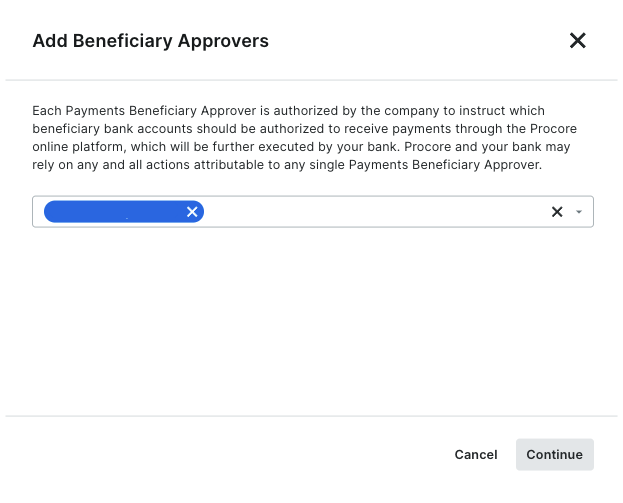

Cliquez sur Continuer.
Révisez les noms dans la liste des approbateurs de bénéficiaires des paiements .
Cliquez sur Ajouter un approbateur. Une bannière VERTE indique que l’action a réussi. Procore enregistre également l’action « Utilisateur ajouté en tant qu’approbateur » dans l’historique des modifications.