Timesheets Insights
The company-level Timesheets Insights provide visibility into the employee time submission coverage across the entire organization. This insight is available in the company-level Timesheets tool.
Note: To access Timesheets Insights, users require 'View Company Timesheet Insights' granular permission enabled on the Insights tool.
The company-level Timesheets insight:
Compares Weekly Assigned versus Actual Hours across your organization to highlight employees with missing time (Planned > Actual) or excessive hours (Actual > Planned) for an active project. Assigned (planned) hours reflect Resource Planning assignment, while actual hours are derived from timesheets. Payroll administrators and project stakeholders can quickly spot discrepancies between assigned and actual hours for the current or previous work week to ensure accuracy before processing payroll.
Provides a single, company-wide view of submitted and missing time entries. Payroll administrators and project stakeholders no longer need to check projects one by one to find incomplete or inaccurate time entries.
Helps to monitor labor risks early, ensuring accurate, on-time payroll and labor forecasting.
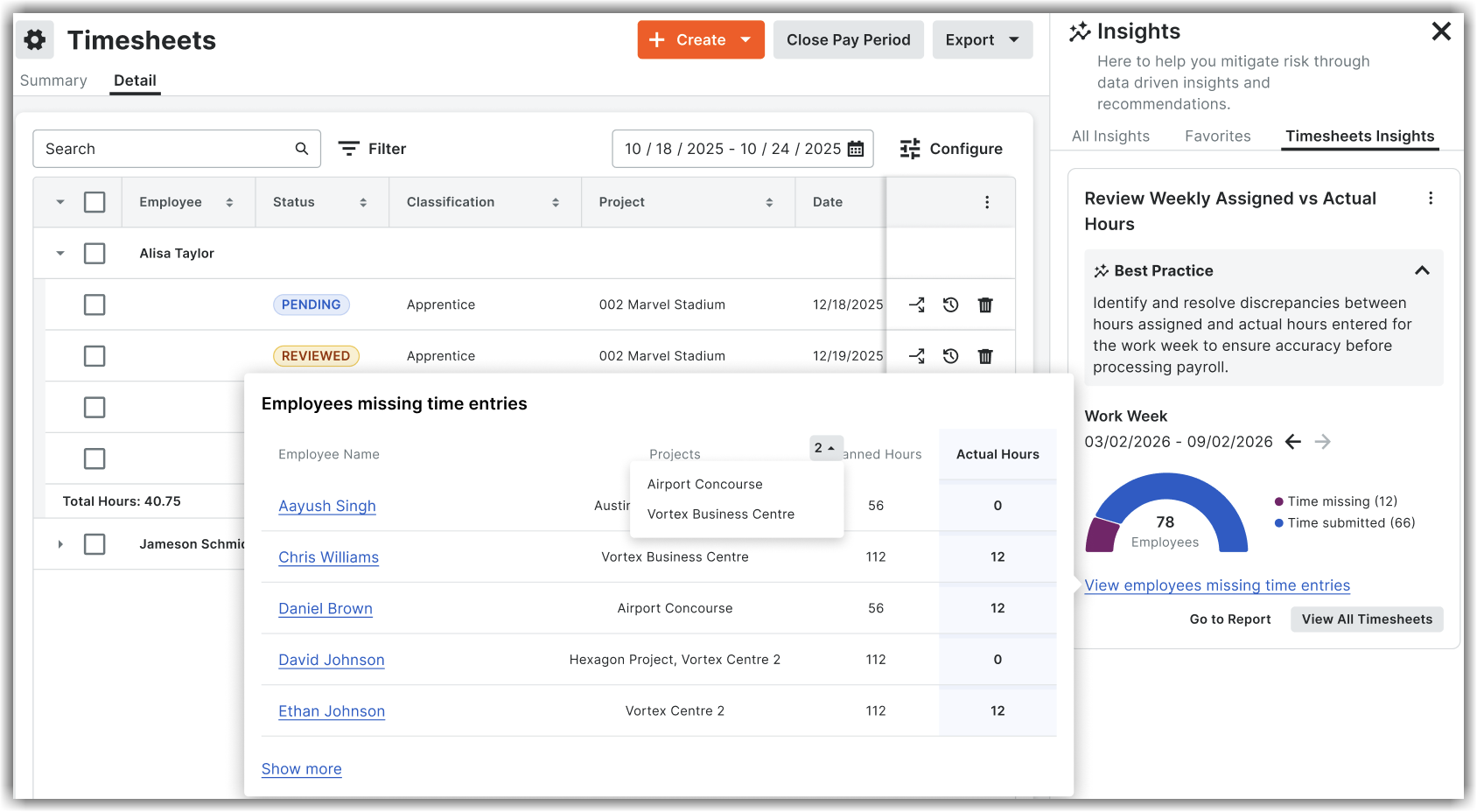
The Review Weekly Assigned vs Actual Hours section in the insight contains the following components:
Work Week: Allows to select the current week or previous week for which you want to view the timesheet data.
Visual gauge: Displays the count of submitted time and missing time entries for the selected week. On hovering over Time submitted or Time missing, the percentage breakdown for the time submitted or missing is shown.
View employees missing time entries: Allows to view a list of employees and their missing time entries in a separate screen in detail. For example, employee name, project name, planned hours, and actual hours. Clicking on Show More shows data for all employees. Users can drill-down to view each employee's data by clicking on their name.
View All Timesheets: Navigates to the company-level Timesheets tool, listing all the employees and their data in detail. Users can filter and view the required employees' data.
Go to Report: Allows to view a pre-populated report template that shows a filtered report of all time entries for the selected work week.