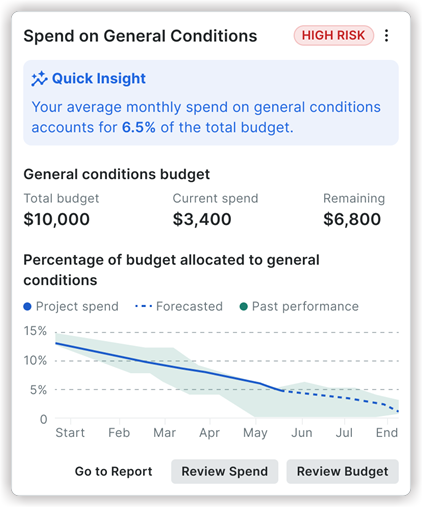
Spend on General Conditions
This project-level Insights tool offers a broader perspective, allowing companies to understand their general conditions spending trends across multiple projects.
Quick Insight: Provides a company-level benchmark such as: "Over the past 4 quarters, general conditions made up an average of 6.5% of each project's budget."
Percentage of budget allocated to General Conditions for active projects: A line chart visualizing the trend over the Past 4 quarters and Same time the prior year. Hovering over these displays detailed project and budget metrics for specific months.
Forecast availability: Indicates that predictive insights are available for a subset of projects.
Actions:
Go to Report: Navigates to a company-level report or dashboard related to general conditions spending.
Review Spend: Take you to a tear sheet listing projects with financial risk information.
Risk Tags : Helps users quickly identify and prioritize high-risk areas within their projects. By categorizing insights with High, Medium, or Low risk levels, users can focus on the most critical issues at a glance.
How this insight is calculated: This insight calculates spend from the project’s direct Costs and commitment invoices, and only includes costs recorded against the cost codes configured as general conditions. Each cost is assigned to a month using the following date fields:
Direct Costs - Uses the Date field on the direct cost. If the Date field is blank, the insight uses the date the direct cost was created in Procore.
Commitment Invoices - Uses the Billing Date field on the invoice. If the Billing Date field is blank, the insight uses the Period End Date. If both are blank, the insight uses the date the invoice was created in Procore.
Note:: If your ERP integration has transaction syncing enabled, commitment invoices are automatically synced to Procore as direct costs. To avoid counting the same cost twice, this insight only calculates spend from direct costs.