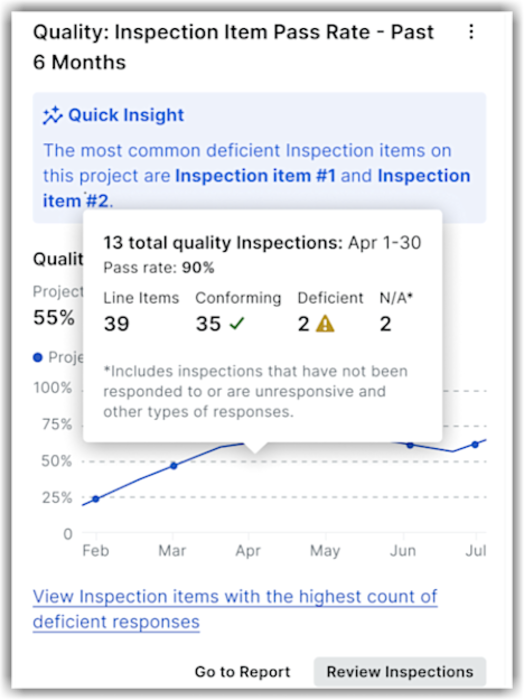
Inspection Item Pass Rate - Past 6 Months
This project-level Insights tool shows the percentage of inspection line items that pass on the first inspection for a rolling last six months period. The insight measures the health of your project's quality control.
A high first-time pass rate means fewer delays, lower costs, and less rework. By comparing performance with company benchmarks, you can quickly spot patterns, address recurring problems, and improve project quality—saving time, reducing rework, and keeping your projects on track.
Note: To access the project-level Inspection Item Pass Rate insight, users require 'View Project Inspection Insights' granular permission enabled on the project's Inspection tool.
The project-level Inspection Item Pass Rate insight:
Shows the average percentage of inspection item conforming pass rate on the first inspection for a project with company as a benchmark. This allows teams to benchmark their performance against peers to adopt best practices, reduce rework, and avoid delays.
Provides a rolling last six months view to highlight trends in Conforming versus Deficient items.
Displays a snapshot with Quality or Safety in the insight's heading section based on your quality or safety tool breakdown. For example, Quality: Inspection Item Pass Rate - Past 6 Months or Safety: Inspection Item Pass Rate - Past 6 Months.
Allows to hover over the line charts to see detailed monthly statistics (total line items, conforming, deficient, N/A). For example, number of inspections items not responded to or unresponsive.
Highlights the effectiveness of inspection processes by revealing how often inspections meet requirements on the first attempt at the project level.
Allows to drill into inspection items with the highest number of deficient responses. Click View Inspection items with the highest count of deficient responses to identify templates or individual line items that frequently fail so you can target training or process changes.
To navigate directly to reports, click Go to Reports. To view all inspections, click Review Inspections, or go directly to the project's Inspections tool for deeper analysis and follow‑up.