Configurer la vue du budget des coûts de productivité de la main-d’œuvre Procore
Arrière-plan
La vue du budget « Coût de productivité du travail Procore » permet aux équipes de projet d’inclure les quantités produites dans le budget du projet. Voir Que sont les « quantités produites » ? S’appuyant sur la fonction de calcul des coûts de main-d’œuvre en temps réel , la vue du budget « Coût de productivité de la main-d’œuvre Procore » est conçue pour fournir aux entrepreneurs autonomes et spécialisés la possibilité de mieux comprendre les taux de production de votre projet afin de prendre de meilleures décisions et de maximiser les marges bénéficiaires. Avec cette version, vous pouvez :
Ajouter et importer des unités de production au budget d’un projet dans les outils de gestion financière de Procore : budget, événements de changement et ordres de service.
Collectez les unités de production du personnel de chantier avec les entrées de pointage dans le rapport journalier et les outils Pointage et Feuilles horaires.
Suivez et comparez les unités de production budgétées aux unités de production installées à l’aide des outils Budget et Rapports de Procore.
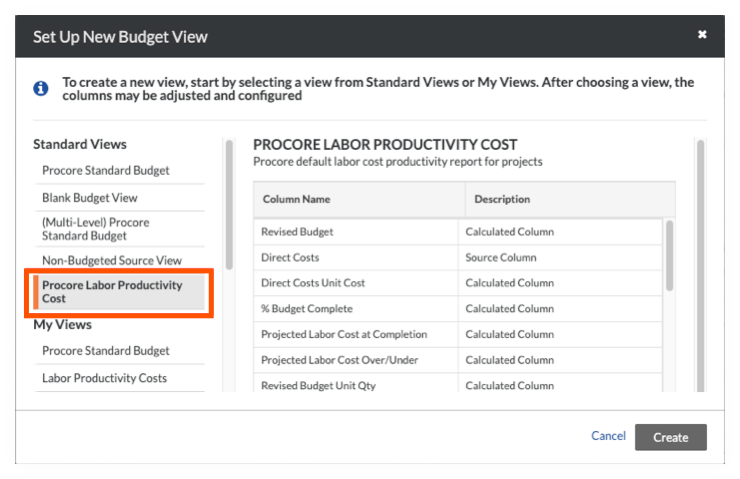
Par défaut, Procore met à disposition de ses utilisateurs la vue du budget standard « Coût de productivité du travail Procore », qui est disponible pour l’administrateur Procore de votre entreprise dans l’outil Admin au niveau entreprise.
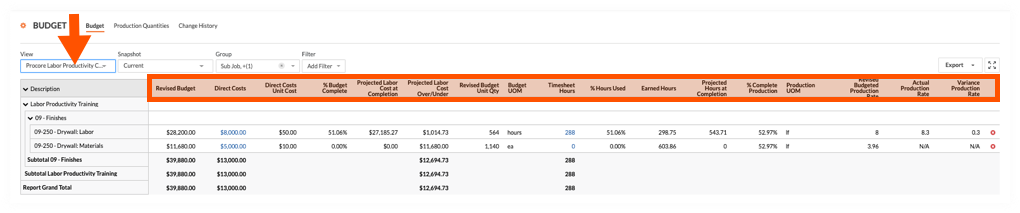
Vue du budget Coût de productivité du travail Procore dans l’outil Budget
L’illustration ci-dessous vous montre la disposition recommandée pour la vue du budget « Coût de productivité du travail Procore », telle qu’elle apparaîtra lorsqu’elle sera appliquée à l’outil Budget de votre projet.