Importer des quantités installées
Télécharger le modèle de quantités produites installées
Accédez à l’outil Budget du projet.
Sous l’onglet Budget , sélectionnez la vue « Coût de productivité du travail Procore » dans la liste déroulante Afficher .
Sous Importer les quantités installées, cliquez sur le lien Télécharger le modèle Excel .
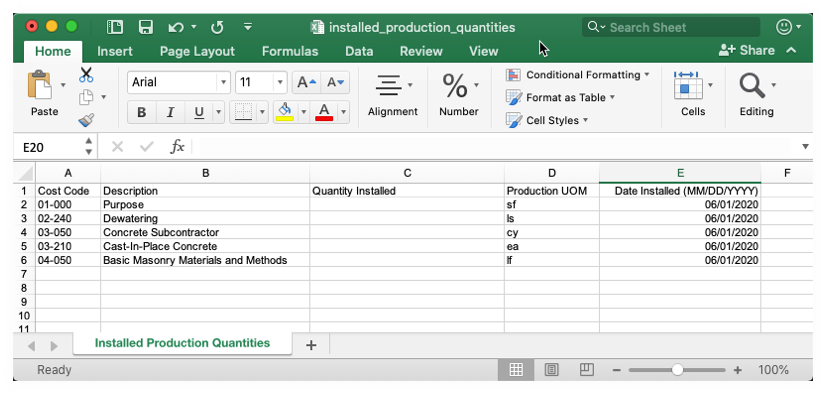
Sur votre ordinateur, ouvrez le fichier téléchargé nommé installed_production_quantities.xlsx. L’illustration ci-dessous vous montre le fichier à télécharger :
Passez aux étapes suivantes.

Mettre à jour le modèle de quantités produites installées
Dans le fichier installed_production_quantities.xlsx , saisissez les données comme suit pour les quantités produites installées que vous souhaitez mettre à jour :
ImportantN’ajoutez PAS de nouveaux postes et ne modifiez PAS les valeurs existantes dans le fichier Microsoft Excel. Il est conçu uniquement pour importer les valeurs « Quantité installée » pour vos codes de coût existants.
code de coût. Affiche le code de coût qui correspond à la quantité produites installée que vous souhaitez mettre à jour. Les codes de coûts sont gérés dans la structure de découpage du projet de Procore.
La description. Affiche la description du code de coût. Les codes de coûts sont gérés dans la structure de découpage du projet de Procore.
Quantité installée. Saisir la quantité installée pour ce code de coût en utilisant des nombres entiers.
Unité de mesure de production. Affiche l’unité de mesure (UOM). Pour en savoir plus sur les sélections par défaut de cette liste, voir Quelles unités de mesure sont incluses dans la liste principale de Procore ? et Ajouter une unité de mesure à la liste principale des unités de mesure.
Date d’installation (JJ/MM/AAAA). Saisissez la date d’installation qui correspond à la saisie « Quantité installée » en utilisant le format MM/JJ/AAAA.
Enregistrez votre fichier Microsoft Excel au format CSV.