Gestion du changement avec événements de changement
L’outil Événements de changement de Procore a été conçu pour tout projet de travail pouvant potentiellement entraîner un coût supplémentaire. Avec cet outil, vous créez un événement de changement qui aide votre équipe à mieux comprendre le coût potentiel d’un changement, avant qu’il ne devienne un coût réel. Après avoir créé un événement de changement, vous pouvez ensuite utiliser l’outil pour créer une DDD (Demande de devis), qui est envoyée aux collaborateurs en aval appropriés pour tarification.
Une fois les DDD créées et que vos sous-traitants ont répondu avec un devis, votre équipe peut également créer des ordres de service basés sur le devis soumis. Vous pouvez configurer votre flux de travail d’ordre de service en définissant le nombre de niveaux d’ordre de service : un, deux ou trois niveaux. Un plus grand nombre de niveaux d’ordres de service rend le flux de travail plus complexe, mais offre un contrôle accru. Voir Quels sont les différents paramètres de niveau d’ordre de service dans Finances ?
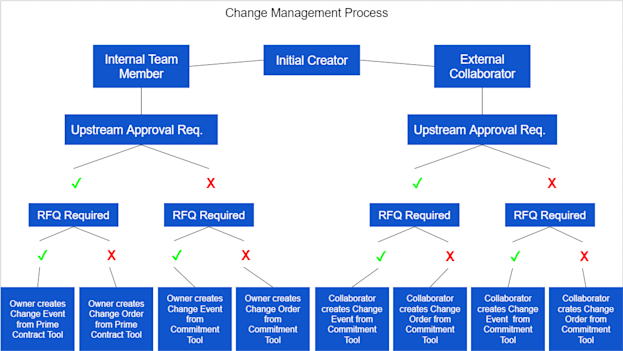
L’exemple d’image ci-dessous vous montre comment une entreprise peut gérer son processus de gestion des changements à l’aide de l’outil Événements de changement. Gardez à l’esprit que cette image vous montre simplement les options dont vous disposez lors de l’activation des outils Événements de changement. Si vous préférez simplement créer des ordres de service, vous n’avez pas besoin d’activer l’outil Événements de changement.
Pour en savoir plus
Pour en savoir plus sur l’outil Événements de changement, veuillez lire :
Créez une DDD (Demande de devis) pour obtenir un devis des sous-traitants pour la tarification :
Révisez les réponses aux DDD pour examiner les devis qui ont été soumis par les sous-traitants et déterminer si vous souhaitez créer un ordre de service à partir de la DDD :
Vous pouvez créer un ordre de service de l’engagement avant ou après l’obtention d’une réponse à la DDD :
Si l’outil Contrats clients, Financement ou Contrats principaux est activé, vous pouvez créer un ordre de service potentiel avant ou après la réponse à la DDD :
Pour plus d’informations sur l’outil Événements de changement, voir Événements de changement.