View funding accounts
Navigate to the Company level Payment tool.
Click the payments settings
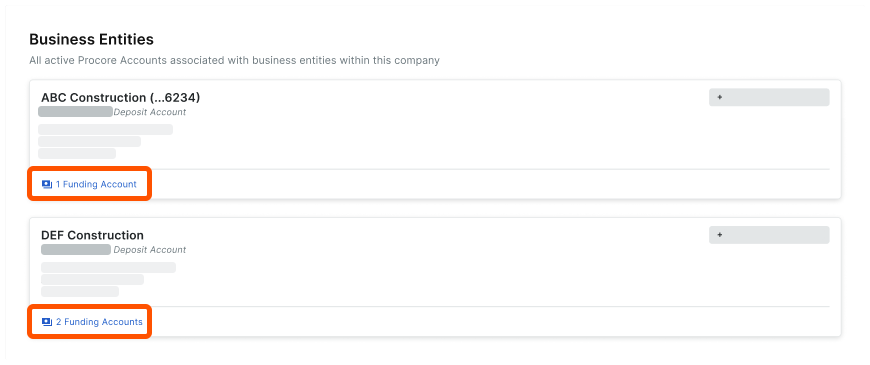
 icon. This opens the payments settings page. The 'Business entities' page in the 'payment processing' tab is active by default. This page lists all of your company's business entities that have been configured to pay payment applications.
For each business entity, click the funding account(s) link to view the account information.

Funding accounts table
The table below details the elements for the funding accounts table. Verified funding accounts can receive drawdown requests when creating disbursements.
Element | Type | Description | Learn more... |
|---|---|---|---|
Nickname | Field | A payment admin enters the account nickname when linking an account. The nickname allows payment disbursers to identify an account when creating disbursements. It also protects your financial privacy by eliminating the need to provide disbursers with the full bank account number. | |
Verification status | Field | Shows the current verification status of the account. | Add funding accounts as a payor What are the default verification status for bank accounts in Procore Pay? |
Bank ID | Field | A payment admin enters a unique bank ID portion to be part of the unique cheque number issued to the next payment application payout from this account. A payout is a payment application payment in a disbursement. | |
Next check no. | Field | A payment admin enters a unique Next check no to be part of the unique check number issued to the next payment application payout from this account. A payout is a payment application payment in a disbursement. | |
Default | Field | Indicates the account is the default withdrawal account for Procore Pay in the payer environment. | |
Deactivated | Field | Indicates the account has been deactivated. | |
Overflow | Menu | Click the vertical ellipsis and choose one of the menu options. The available options in this menu are: Edit, Set as default funding account and Deactivate. On the default account, only Edit and Deactivate are available. On a deactivated account, only Edit is available. |