Qu’est-ce qu’un contact de facturation ?

Vous utilisez la terminologie du maître d’ouvrage ou de l’entrepreneur spécialisé ?

Procore peut être configuré pour utiliser une terminologie spécifique aux entreprises générales, aux maîtres d’ouvrage ou aux entreprises spécialisées. Découvrez comment appliquer les options du dictionnaire.

  • To learn the differences: Show/Hide

    • This table shows the differences in tool names (bold) and terms across the point-of-view dictionaries for Project Financials.

      Entrepreneurs généraux
      Anglais (États-Unis) - Par défaut

      Propriétaire
      Anglais (Terminologie du propriétaire V2)

      Entrepreneurs spécialisés
      Anglais (terminologie des entrepreneurs spécialisés)

      Facturation

      Facturation

      Facturations proportionnelles

      Propriétaire

      Financement

      Propriétaire

      Maître d’ouvrage/Client

      Maître d’ouvrage/Client

      CG/client

      Ordre de changement au contrat principal

      Ordre de changement de financement

      Ordre de changement du contrat client

      Contrats principaux

      Financement

      Contrats clients

      Revenu

      Financement

      Revenu

      Sous-traiter

      Contrat

      Sous-traiter

      Sous-traitant

      Entrepreneur

      Sous-traitant

      Ventilation des coûts du sous-traitant (VDCS)

      Ventilation des coûts de l’entrepreneur (VDCST)

      Ventilation des coûts du sous-traitant (VDCS)

      About These Dictionaries
      • Default Setting: The 'General Contractor' dictionary is enabled by default for all accounts.

      • Availability: These alternate dictionaries in italics are available in US English only.

      How to Switch Your Dictionary

      To change your company's terminology to the Owner or Specialty Contractor dictionary, contact your company's . They will work with your Procore Point of Contact to make the change.

Answer

Un contact de facturation est une personne qui s'assure qu'une facture est soumise à un sous-traitant en amont pour paiement. Dans Procore, un contact de facturation est toujours un employé de l'« entreprise sous-traitante » désignée sur un bon de commande ou un contrat de sous-traitance. L'entreprise sous-traitante est la partie responsable de l'exécution des travaux et/ou de la fourniture des matériaux pour un projet. Pour les clients aux États-Unis utilisant l'outil Facturations proportionnelles de Procore, ce terme est synonyme de « contact de facturation proportionnelle ».

Common Questions

  • What permissions do invoice contacts need to create & submit subcontractor invoices in Procore?

  • Do invoice contacts need to be granted special access permissions to Procore?

  • How do I add invoice contacts to Procore?

  • Unsure about your invoice contact status or missing an 'Invite to Bill'?

  • When does Procore send an 'Invite to Bill'?

  • Does an invoice contact need an 'Invite to Bill' to create an invoice?

  • What can invoice contacts add or update in Procore?

  • Do invoice contacts receive emails from Procore?

What permissions do invoice contacts need to create & submit subcontractor invoices in Procore?

This table details the permissions that invoice contacts need to create subcontractor invoices in Procore.

1 Some Procore clients choose to provide invoice contacts with 'Standard' level permissions on the Commitments tool. It is important to note that providing external collaborators with permissions higher than 'Read Only' level permissions is NOT recommended by Procore.

Do invoice contacts need to be granted special access permissions to Procore?

No. When designated as an invoice contact on a commitment, Procore automatically adds the contact to the 'Private' list for that commitment. An invoice contact can then view the commitment and its invoices in Procore.

 Note

Sur une facture de sous-traitant, le nom du contact apparaît dans la section « Facture » de l’onglet « Paramètres avancés » de la zone « Contacts de facturation ».

How do I add invoice contacts to Procore?

To add an invoice contact, an authorized user for the company managing the in the Procore project must:

  1. Add the subcontracting company to the Company Directory. The subcontracting company corresponds to the 'Contract Company' on a commitment. See Add a Company to the Company Directory. The user who will be the invoice contact must be added to the company. See Add Users to the Company.

     Notes 

  2. Grant the invoice contact's user account 'Read Only' level permissions on the Project level Commitments tool. Procore recommends managing invoice contact permissions with a project permissions template. See Create a Project Permission Template.

  3. Add the 'Contract Company' and 'Invoice Contact' to the commitment. See Add Invoice Contacts to a Purchase Order or Subcontract.

  4. Optional. Configure optional email notifications for the invoice contact:

Unsure about your invoice contact status or missing an 'Invite to Bill'?

  • Invoice submission rights can only be granted by an Contact the upstream collaborator to confirm that you have been added as an invoice contact on your commitment. See Add Invoice Contacts to a Purchase Order or Subcontract.

  • If you can't find your 'Invite to Bill' (despite having sufficient permissions), the administrator may not have sent it. An invoice contact can still create a new invoice for their commitment in the Commitments tool. See Does an invoice contact need an 'Invite to Bill' to submit an invoice?

  • If you lack invoice submission rights, contact the upstream collaborator. Some administrators prefer to collect your invoice in paper or digital form and create it on your behalf in their Procore project. Reach out to them for further instructions.

When does Procore send an 'Invite to Bill'?

When an for the Procore company account creates a new billing period, that user has the option to send out an automated billing invite to anyone who is either (1) named on the 'Private' list for the invoice or (2) a member of the Commitment tool's default 'Invoice Contact' list. See Add Invoice Contacts to a Purchase Order or Subcontract.

Does an invoice contact need an 'Invite to Bill' to create an invoice?

No. An invoice contact has several options for creating an invoice.

Il existe deux façons de répondre à une « invitation à facturer » en tant que contact de facturation : (1) à partir de l’e-mail « Invitation à facturer » ou (2) à partir de l’outil Engagements au niveau projet du collaborateur en amont. Utilisez la deuxième option lorsque vous savez que vous disposez des autorisations de contact de facturation, mais que l’invitation à facturer est manquante ou perdue.

Lorsque vous répondez à une invitation, vous pouvez l’accepter ou la refuser comme suit :

  • To respond to an 'Invite to Bill' email: Show/Hide

      1. Open your email Inbox.

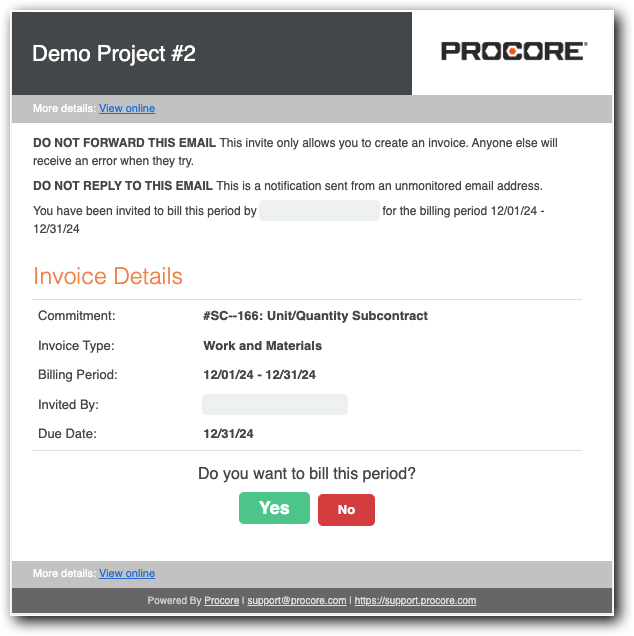
      2. Look for the email message with the subject line, " "Project Name: User Name has invited you to bill."

      3. Open the 'Invite to Bill'.

        invite-to-bill.png

      4. Review the Invoice Details:

        • Commitment. Shows the commitment number and name.

        • Invoice Type. Shows the invoice type. See Configure Settings: Invoicing.

        • Billing Period. The date range for the Open billing period.

        • Invited By. The first and last name of the sender. Typically, this is the invoice administrator.

        • Due Date. The date your invoice is due. Invoice contacts cannot create or submit an invoice in the Procore project after this date.

      5. Click one of these buttons to respond to the Do you want to bill this period? prompt:

        • Yes. Accept the invite and submit an invoice. This changes the invoice status to Accepted. Continue with the steps in Submit a New Invoice as an Invoice Contact.

        • No. Decline the invite if you don't want to submit an invoice for the Open billing period. This changes the invoice status to Declined.

  • To respond to an 'Invite to Bill' in the Commitments tool: Show/Hide

    • Navigate to the project's Commitments tool.

    • Locate the commitment to which you were added as an invoice contact.

    • Under Do you Want to Bill this Period?, indicate your intent to submit an invoice by clicking the Yes button.
      do-you-want-to-bill-this-period.png

    • Click the Post Response button.

 Tip

Can't find your 'Invite to Bill' or uncertain if one was sent? An invoice contact always has sufficient permissions to create a new invoice for an open billing period in the upstream collaborator's Procore project. See Create a New Invoice as an Invoice Contact.

What can invoice contacts add or update in Procore?

You can only perform tasks in Procore when you are added as an invoice contact on a commitment in the upstream collaborator's Procore project. What you can do and how you do it depends on the options used by the upstream collaborator.

Les contacts de facturation peuvent...

Pour en savoir plus...

Accepter ou refuser une « invitation à facturer » à partir de l’e-mail envoyé par un administrateur des factures. Voir Envoyer une invitation à facturer à un contact de facturation.

Accepter ou refuser une « invitation à facturer » comme contact de facturation

Répondre à une invitation à facturer envoyée par un administrateur des factures. Voir Envoyer une invitation à facturer à un contact de facturation.

Soumettre une nouvelle facture en tant que contact de facturation

Créez une facture dans l’outil Engagements sans invitation à facturer de la part d’un administrateur des factures. Vous devez accorder au destinataire les autorisations de contact de la facture.

Créer une nouvelle facture en tant que contact de facturation

Mettre à jour la ventilation des coûts d’un sous-traitant. Cette fonctionnalité doit être activée sur le projet. Voir Activer ou désactiver l’onglet Ventilation des coûts du sous-traitant dans l’outil Engagements.

Mettre à jour la ventilation des coûts d’un sous-traitant en tant que contact de facturation

Révisez et renvoyez tous les postes de facture rejetés par un administrateur des factures.

Réviser et renvoyer une facture de sous-traitant en tant que contact de facturation

Do invoice contacts receive emails from Procore?

Yes. Procore sends email notifications to invoice contacts when these actions occur:

Actions

Détails & En savoir plus

Prochaine étape

Lorsqu’un engagement avec un contact de facturation désigné est créé.

L’e-mail est envoyé lorsque le collaborateur en amont clique sur « Créer et envoyer par e-mail » ou « Enregistrer et envoyer par e-mail » dans l’onglet Général de l’engagement. Voir Envoyer une invitation à facturer à un contact de facturation depuis l’outil Facturation.

Si un administrateur des factures définit l’option « Rappeler aux sous-traitants de facturer ».

Si un contact de facturation accepte une « invitation à facturer », un rappel est envoyé à l’intervalle spécifié jusqu’à ce que la facture « ébauche » soit soumise. Les rappels ne sont plus envoyés une fois que le statut de la facture passe à « En révision ».

Lorsque la ventilation des coûts du sous-traitant est « Rejetée ». Voir Qu’est-ce qu’une ventilation des coûts du sous-traitant ?

Un e-mail est envoyé lorsque le collaborateur en amont change le statut d’une ventilation des coûts du sous-traitant en « Réviser et renvoyer ». Voir Réviser une facture de sous-traitant en tant qu’administrateur des factures.

Si le collaborateur en amont a configuré le paramètre Envoyer une notification d’expiration pour l’assurance dans l’outil Annuaire au niveau entreprise.

Un courriel est envoyé lorsque l’assurance est à moins de deux (2) semaines de sa date d’expiration. Voir Ajouter une assurance à un enregistrement d’entreprise dans l’annuaire de l’entreprise.

Si le collaborateur en amont a configuré le paramètre Notifier les sous-traitants lorsque les factures sont approuvées dans l’outil Facturation au niveau projet.

Un e-mail est envoyé lorsque le collaborateur en amont définit le statut de la facture sur « Approuvé ». Voir Configurer les paramètres : facturation et Modifier par lot le statut des factures de sous-traitants.

-

See Also

Loading related articles...