Select the Measurement System

Deployment Status & Regional Availability

Model Manager, Procore’s next-generation replacement for the Models tool, officially launches in General Availability across the UK and Ireland (UKI) on October 13, 2026, alongside a global Beta for all other regions. Procore Mobile App (iOS/Android) support is also live in Beta as Procore continues to transform 3D model workflows. Stay tuned for additional features in future releases.
For platform deployment status & regional availability Show/Hide

The Model Manager and the Models tool can be active on the same project at once. Administrators are not required to disable the Models tool.

Platform

Deployment Status/Region

Learn More

Web

  • General Availability: United Kingdom & Ireland (UKI) on October 13, 2026

  • Beta: All other regions

iOS

  • Beta: All regions

Android

  • Beta: All regions

Model Manager Beta: Access & Guidelines

  • Registration: Participating companies must sign the Procore Beta Agreement. Once signed, your Procore Administrator will coordinate with your Procore point of contact to enable Model Manager on specific projects. It is not available in Procore Explore.

  • Support & Feedback: Please report critical or breaking issues directly to Procore Customer Support. For general feedback, feature requests, and non-critical issues, contact your dedicated Beta program lead or Procore point of contact.

  • Beta Notice: This feature and its supporting documentation are in active development. Beta services are provided strictly "as is" for evaluation purposes, carry no standard warranties or liability, and are subject to change or discontinuation without notice. For full terms, please refer to the Procore Subscription Services Agreement.

Setting your preferred measurement system allows you to accurately view and analyze 3D models based on your project's regional standards or specific business needs. Toggling these units while viewing a model helps to ensure dimensional consistency when inspecting and reviewing model data.

Things to Consider

  • Required User Permission

  • Additional Information:

    • The viewer automatically defaults to Imperial or Metric based on the project’s country/locale configured in the Project Admin tool's Settings. See Update General Project Information.

    • From the viewer's Settings panel, you can switch unit preferences at any time during your current viewing session. Changing the setting immediately applies them across all measurement tools, without impacting the default setting for other project users.

Prerequisites

Steps

  1. Navigate to the project's Model Manager tool.

  2. View a model.

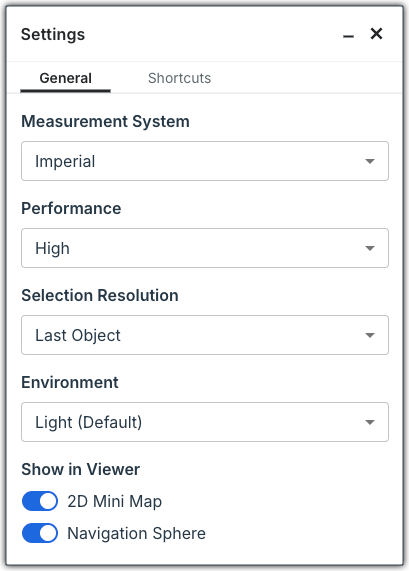
  3. Click Settings in the top right to open the General tab of the Settings page.

  4. Choose a Measurement System:

    • Imperial. The traditional system used primarily in the United States, measuring length in inches, feet, yards, and miles.

    • Metric (meters). The global standard base for unit length using everyday, human-scale measurements like building dimensions, room sizes, and outdoor distances.

    • Metric (millimeters). A global standard for engineering, manufacturing, and product design that allows extreme precision using whole numbers instead of decimals for fractions.


      This image shows the Next-Gen Viewer settings, which you can configure at any time in the Model Manager tool.

  5. Click Close (X).


Windows is a registered trademark of Microsoft Corporation in the United States and other countries. Google Chrome, Android, and Google Play are trademarks of Google LLC. iPhone, iPad, and App Store are trademarks or service marks of Apple Inc., registered in the U.S. and other countries and regions. iOS is a trademark or registered trademark of Cisco in the U.S. and other countries and is used under license by Apple Inc. Autodesk, AutoCAD, Civil 3D, Navisworks, and Revit are registered trademarks or trademarks of Autodesk, Inc., and/or its subsidiaries and/or affiliates in the USA and other countries. SpaceMouse is a registered trademark of 3Dconnexion. All other trademarks are the property of their respective owners.