View requirements

  1. Navigate to the Project level Payment Applications tool.

  2. Click the Subcontractor tab

  3. Locate the payment application and click the payment application # link to open it.

     Tip

    Did you know you can also open payment applications from the Commitments tool? Navigate to the Commitments tool, click the commitment to open and then click the Payment applications tab. Click the Payment application # link and then follow the steps below.

  4. In the payment application, click the payment requirements tab.

Available payment requirements

The payment requirements tab shows the following information:
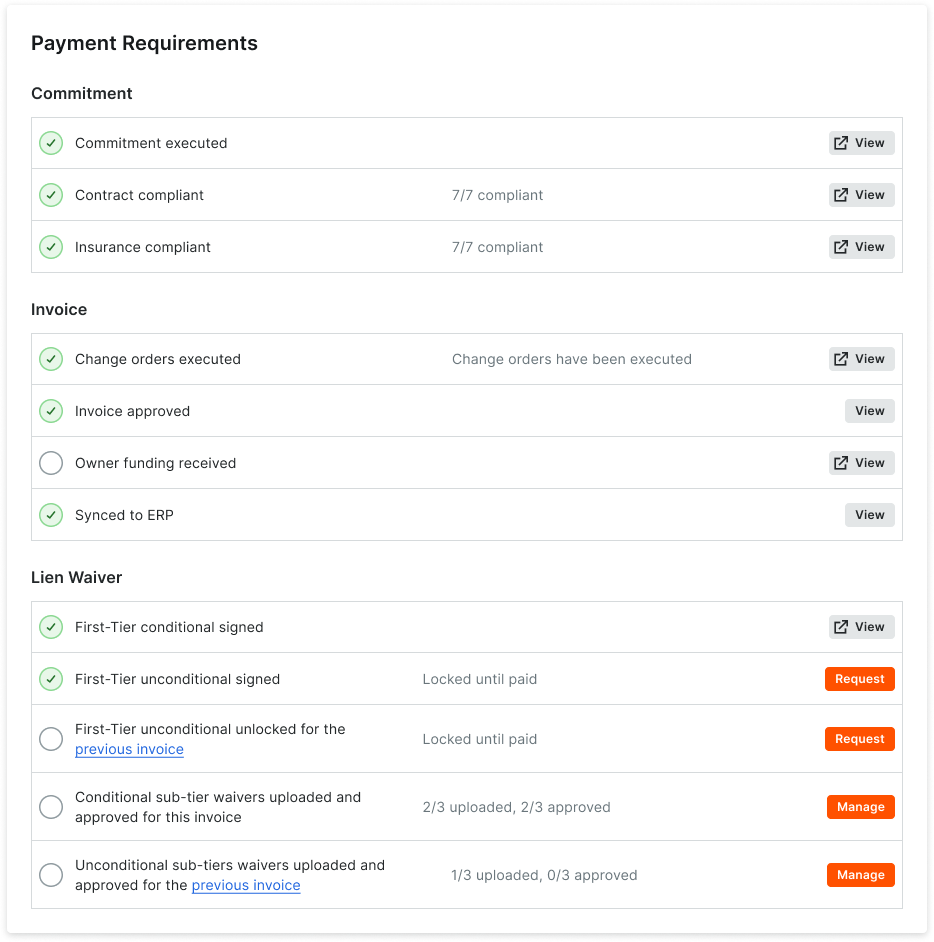
Payment Requirements Invoice Administrator

Payment requirements

This table details the payment requirements.

 Note

If you are a payment application administrator, these buttons are visible in this tab:

  • View. Opens the subcontractor payment application so you can view or edit the corresponding item.

  • Request. Lets you send an email request to a payment application contact to request that they unlock a signed unconditional lien waiver.

  • Manage. Opens the lien rights tab of the subcontractor payment application.

Category

Requirement

When the requirement is ON...

When the requirement is OFF...

Learn More

Commitment

Commitment executed

Tracks the commitment associated with the payment application to ensure a check mark appears in the 'Executed' box.

Doesn't track the 'Executed' state on the commitment.

Create a commitment Edit a commitment

Contract compliant

Tracks the status of the contract compliance documents for the commitment.

Doesn't track the compliance status of the insurance certificates

Manage contract compliance documents & statuses for a commitment

Insurance compliant

Tracks the status of the insurance certifications for the commitment.

Doesn't track the compliance status of the insurance certificates.

Manage insurance & compliance status for a commitment

Holds released

Tracks the status of any payment holds applied to payment applications. Holds must be released before payment.

Doesn't track payment applications for payment holds.

Manage payment holds as a payor

Payment application

Variations executed

Tracks variations that impact the contract associated with the payment application and require them to be in the 'Executed' state.

Doesn't track variations.

Create a variation

Payment application approved

Tracks payment applications to ensure they are in one of these status: Approved, Approved as noted and Pending owner approval. See What are the default statuses for Procore payment applications?

Doesn't track payment application status.

Bulk edit the status of subcontractor payment applications with the Payment Applications tool

Owner funding received

Ensures the main contract payment application is shown as fully paid on the 'Payment received' tab.

Doesn't track 'payment received' entries on main contract payment applications or compare values on the subcontractor payment application.

Create a record for a payment received

Sync to ERP

Tracks the payment application to ensure it is synced with an integrated ERP system.

Doesn't track payment application syncing with ERP

ERP integrations

Lien waiver

First-tier conditional lien waiver signed

Tracks first-tier signatures on conditional lien waivers on your payment applications. Note: Only appears on a payment application when the requirement is enabled on its project. See Enable lien waiver templates on a project.

Doesn't track signatures

Create lien waiver templates

First-tier unconditional lien waiver signed

Tracks first-tier signatures on unconditional lien waivers for your payment applications. Note: Only appears on a payment application when the requirement is enabled on its project. See Enable lien waiver templates on a project.

Doesn't track signatures

Create lien waiver templates

First-tier unconditional unlocked for the previous payment application

Tracks first-tier signatures on unlocked unconditional lien waivers for the commitment's previous payment applications. Notes: Only appears on a payment application when the requirement is enabled on its project. See Enable lien waiver templates on a project.

Doesn't track signatures

A payment application administrator can Send a request to unlock a signed unconditional lien waiver. An unconditional lien waiver can only be unlocked by a payment application contact. See Unlock a signed unconditional lien waiver as a payment application contact.

Conditional sub-tier waivers uploaded and approved for this payment application

Tracks when sub-tier waivers are in the 'Approved' status. This requirement will not exist on projects that has disabled sub-tier waivers. Note: If sub-tier waivers are disabled on a project, this requirement won't appear. See Enable the sub-tiers card & add instructions on project payment applications.

Doesn't track signatures

Manage sub-tier waivers

Unconditional sub-tier waivers uploaded and approved for this payment application

Tracks when sub-tier waivers are in the 'Approved' status. This requirement will not exist on projects that has disabled sub-tier waivers. Note: If sub-tier waivers are disabled on a project, this requirement won't appear. See Enable the sub-tiers card & add instructions on project payment applications.

Doesn't track signatures

Manage sub-tier waivers