Beta Participant Guide
Procore Model Manager - Beta Access & Feedback
The Model Manager (Beta) features and documentation are subject to change without notice.
To learn about the beta program, see the Beta Participant Guide.
The Model Manager (Beta) features and documentation are subject to change without notice.
To learn about the beta program, see the Beta Participant Guide.
Welcome to the Beta Program. This guide introduces the Model Manager (Beta) tool, the central hub for your Building Information Modeling (BIM) workflow. Admins can use Model Manager (Beta) to federate 3D models, map 2D drawings for navigation and overlay, and curate saved views. Model data and saved views to simplify the accessibility and usefulness of the model for the larger project team.
Additional Information:
Google Chrome and Microsoft Edge (Latest Version) are supported during the Beta.
Model Manager access is restricted to registered Beta Participants.
Supported File Types:
Activate the Model Manager (Beta) tool on your company's approved Procore project(s). See Enable Model Manager on a Procore Project.
If the tool does not appear in your Project menu, verify your company's participation status with your company's Procore Administrator and Procore point of contact.
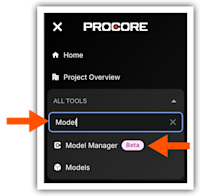
The Model Manager (Beta) tool is located in Procore's project-level tool menu. The Admin view of the Dashboard is the main view and serves as the primary hub for 3D coordination.
Key features include:
Conditioning: Federate and condition multidimensional project data in the Model Manager to configure optimized, field-ready views and streamline data retrieval.
Coordinating: Centralize issue tracking and shorten coordination cycles by placing persistent 3D pins directly on the model to resolve conflicts with shared locational context.
Connecting: Establish a continuous flow of data by linking 3D model objects directly to Procore execution tools, ensuring field decisions are grounded in a single, visual source of truth
Ready to dive in? These direct links are available during the Beta program:
View & Navigate
Measure
Section & Inspect