Tutorials
Procore Model Manager - Beta Access & Feedback
The Model Manager (Beta) tool is exclusively available to registered beta participants. It is not available through Procore Explore. To learn more, see Beta Participant Guide.
Updating the status of the federated project model lets end users know if a project model is active. Because this model streams directly to field teams' mobile devices, keeping its status current ensures collaborators always work with the correct information. The 'Statuses Eligible for Federation' are determined by the Document Management tool's 'Status' fieldset. To learn how to customize them to suit your company's status naming convention, see Edit Custom Fields.
Required User Permissions
Additional Information:
The Document Management tool's Status fieldset populates the Statuses Eligible for Federation within the Model Manager (Beta). See What are custom fields and which Procore tools support them?
If you want to customize the 'Statuses Eligible for Federation', modify the Document Management tool's 'Status' fieldset. For instructions, see Edit Custom Fields.
Navigate to the Model Manager (Beta) tool.
Click
Settings.
Choose from these options:
For first time setup, click the Configure Federation Status button.
For status changes, click the Federation tab.
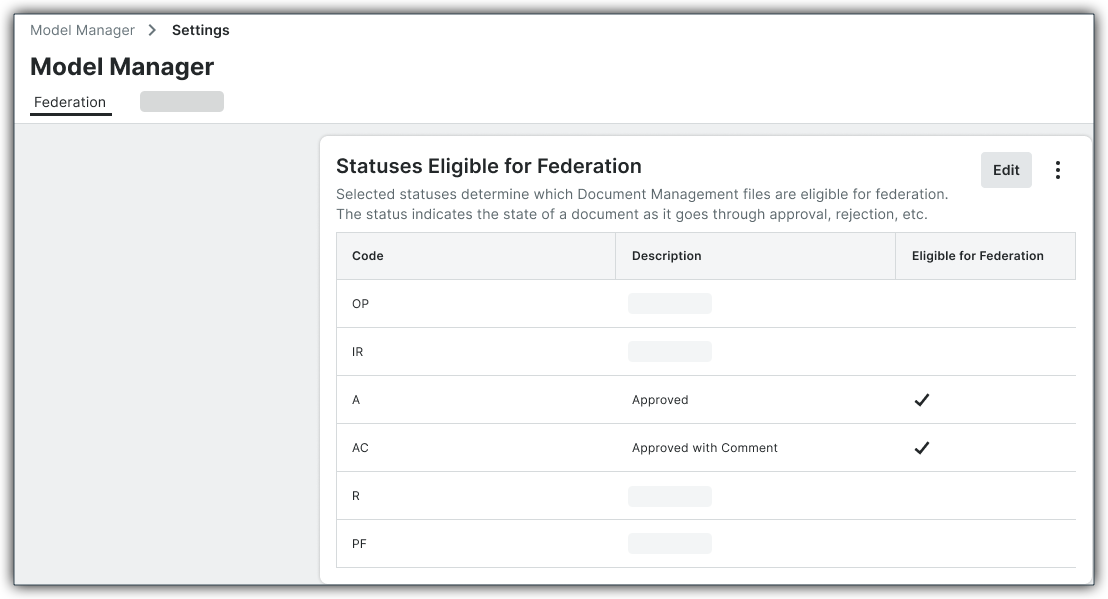
In the Statuses Eligible for Federation window, mark the desired checkboxes.
The example below shows 'Approved' and 'Approved with Comment. However, you can customize the options that appear in 'Statuses Eligible for Federation' window by modifying the Document Management tool's 'Status' fieldset. For instructions, see Edit Custom Fields and What are custom fields and which Procore tools support them?

Click Save.