Use the Navigation Sphere
Procore Model Manager - Beta Access & Feedback
The Model Manager (Beta) features and documentation are subject to change without notice.
To learn about the beta program, see the Beta Participant Guide.
The Model Manager (Beta) features and documentation are subject to change without notice.
To learn about the beta program, see the Beta Participant Guide.
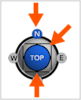
The Navigation Sphere allows you to manipulate the 3D orientation of a model by clicking its faces (such as Top, Front, or Right), corners, or edges. This action snaps the camera to a specific perspective. The Navigation Sphere is the primary tool for perspective management and works great with Orthographic mode. You can also click and drag the sphere to reposition it within the viewer.
Required User Permissions Currently, only Admin permissions are available. Procore will add more permission levels later.
Additional Information:
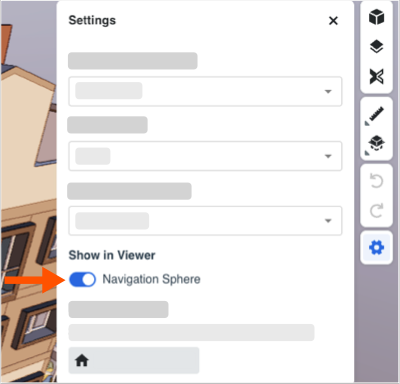
The Navigation Sphere is visible by default.
You can click and drag the navigation sphere to move it where you want.
Follow these steps to learn how to use the navigation sphere.
Early access content …