Manage User Access to Model Manager

Deployment Status & Regional Availability

Model Manager, Procore’s next-generation replacement for the Models tool, officially launches in General Availability across the UK and Ireland (UKI) on October 13, 2026, alongside a global Beta for all other regions. Procore Mobile App (iOS/Android) support is also live in Beta as Procore continues to transform 3D model workflows. Stay tuned for additional features in future releases.
For platform deployment status & regional availability Show/Hide

The Model Manager and the Models tool can be active on the same project at once. Administrators are not required to disable the Models tool.

Platform

Deployment Status/Region

Learn More

Web

  • General Availability: United Kingdom & Ireland (UKI) on October 13, 2026

  • Beta: All other regions

iOS

  • Beta: All regions

Android

  • Beta: All regions

Model Manager Beta: Access & Guidelines

  • Registration: Participating companies must sign the Procore Beta Agreement. Once signed, your Procore Administrator will coordinate with your Procore point of contact to enable Model Manager on specific projects. It is not available in Procore Explore.

  • Support & Feedback: Please report critical or breaking issues directly to Procore Customer Support. For general feedback, feature requests, and non-critical issues, contact your dedicated Beta program lead or Procore point of contact.

  • Beta Notice: This feature and its supporting documentation are in active development. Beta services are provided strictly "as is" for evaluation purposes, carry no standard warranties or liability, and are subject to change or discontinuation without notice. For full terms, please refer to the Procore Subscription Services Agreement.

There are two (2) methods for managing user access to the Model Manager tool. Use the method that matches how many users you need to manage:

  • A Project Permissions Template lets Admins assign consistent Model Manager access across all company projects at once.

  • Managing access directly in the tool works better for one (1) or two (2) users on a single project.

Things to Consider

Prerequisites

Steps

To manage access with a project permissions template Show / Hide Steps

Note

When editing the Project Permissions Template, grant users 'Admin' access to the Model Manager tool.

  1. 导航到公司的权限工具。

  2. 点击项目权限模板标签页。

  3. 在权限模板旁边,点击 作 并选择 编辑模板。

  4. 对于每个项目级别 Procore 工具,选择模板的权限级别:

    • 没有。不授予对 Procore 工具的访问权限。

    • 只读。授予对 Procore 工具只读 访问。

      • 如果可用,请选中要授予的任何 细分权限 的复选框。

    • 标准。授予对 Procore 工具的标准访问权限。

      • 如果可用,请选中要授予的任何 细分权限 的复选框。

    • 管理员。授予对 Procore 工具的管理员访问权限。

  5. 点击 保存 并从以下选项中选择:

    • 救。

    • 保存并返回公司权限。

To manage access in the tool Show / Hide Steps

  1. Navigate to the project's Model Manager tool.

  2. Click Configure.

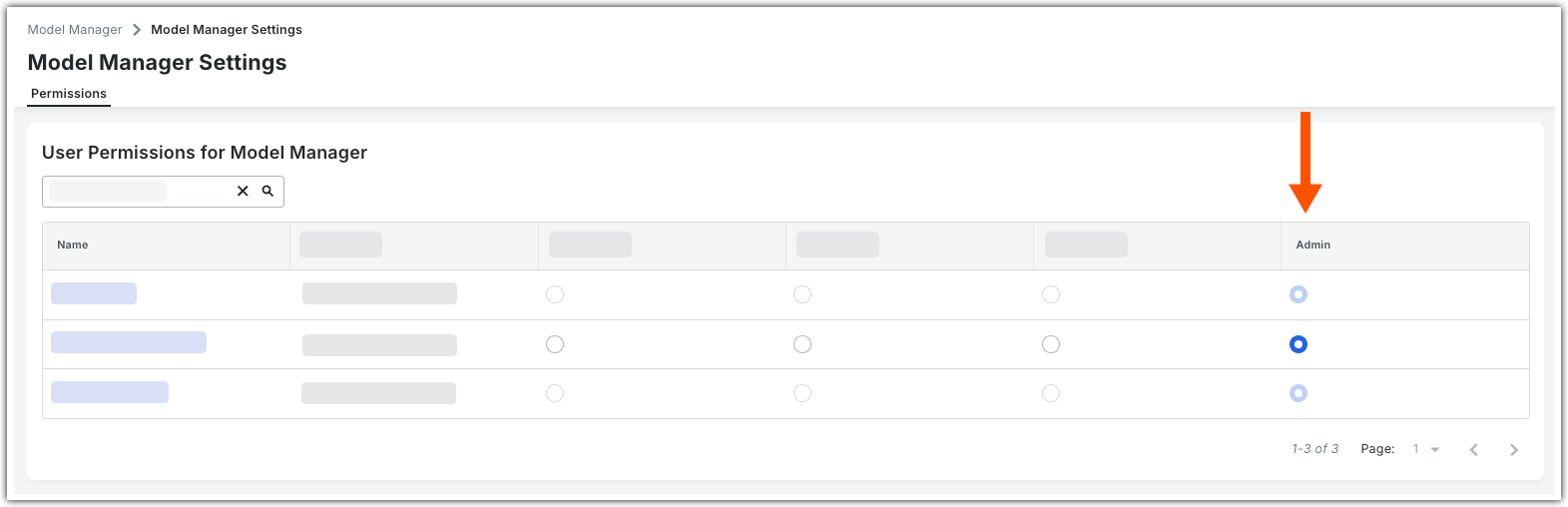
  3. In the Model Manager Settings page, click the Permissions tab.

    Tip

    Do you have a Federation tab? The Federation tab is only available when Document Management is the project's repository. To learn how to configure file statuses, see Configure Federation Status.

  4. Start typing the user's name in the Search box to filter the table to match your entry.

  5. Select the project user.

  6. Grant the project user the appropriate permission level.
    This image shows the Permissions tab in the Configure Settings tab of the project's Model Manager tool.

All changes save automatically.


Windows is a registered trademark of Microsoft Corporation in the United States and other countries. Google Chrome, Android, and Google Play are trademarks of Google LLC. iPhone, iPad, and App Store are trademarks or service marks of Apple Inc., registered in the U.S. and other countries and regions. iOS is a trademark or registered trademark of Cisco in the U.S. and other countries and is used under license by Apple Inc. Autodesk, AutoCAD, Civil 3D, Navisworks, and Revit are registered trademarks or trademarks of Autodesk, Inc., and/or its subsidiaries and/or affiliates in the USA and other countries. SpaceMouse is a registered trademark of 3Dconnexion. All other trademarks are the property of their respective owners.