Modifier les modèles
Accédez à l’outil Paiements au niveau entreprise.
Cliquez sur l’icône
 Paramètres de paiement. La page Paramètres de paiement s’ouvre. L’onglet Traitement des paiements est actif par défaut.
Cliquez sur l’onglet Conditions de paiement. La page renonciations de privilèges est active par défaut.
Dans le tableau Modèles de renonciations de privilèges, recherchez le modèle à mettre à jour. Cliquez ensuite sur Modifier. Le panneau Modifier renonciations de privilèges modèle s’ouvre.
Révisez le modèle et apportez les modifications souhaitées.
Pour modifier la copie, mettez à jour le corps du modèle si nécessaire.
Pour supprimer un espace réservé variable, cliquez sur l’espace réservé dans le corps du modèle et appuyez sur SUPPRIMER.
Pour ajouter un espace réservé de variable, cliquez sur un champ de la liste Variables et utilisez une opération de glisser-déposer pour déplacer la variable dans la position d’espace réservé souhaitée.
PointeVous souhaitez rendre un champ obligatoire ou inclure un texte de remplacement pour les valeurs vides ? Certains espaces réservés variables ont les options suivantes :
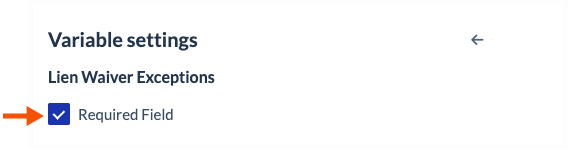
Pour rendre le champ obligatoire, cochez la case Champ obligatoire comme indiqué ci-dessous.
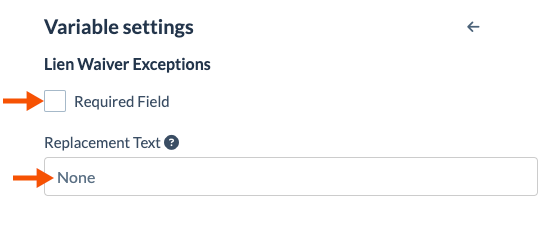
Pour rendre un champ facultatif, décochez la case Champ obligatoire . Pour les champs facultatifs, vous pouvez également saisir un mot ou une expression, de sorte que le texte que vous saisissez apparaît lorsqu’aucune valeur n’est disponible. Par exemple, s’il n’y a pas d’exceptions de renonciation au privilège à inclure, le mot « Aucun(e) » apparaîtra sur la renonciation au privilège au lieu d’un champ vide.
Facultatif. Pour prévisualiser vos modifications, cliquez sur Aperçu.
Cliquez sur Enregistrer. Toutes les mises à jour que vous apportez n’entrent en vigueur qu’à la prochaine renonciation de privilèges du projet. Les mises à jour n’ont aucun effet sur les renonciations de privilège existantes.