Activer les renonciations de sous-traitant sur les projets
Accédez à l’outil Facturation au niveau projet.
Cliquez sur l’icône Paramètres
 .
.Faites défiler jusqu’à la section Renonciations de privilèges.
ConseilsVous ne voyez pas d’options ? Les renonciations de privilège doivent être activées pour Procore Pay. Voir Activer les renonciations de privilège dans l’outil Paiements de l’entreprise.
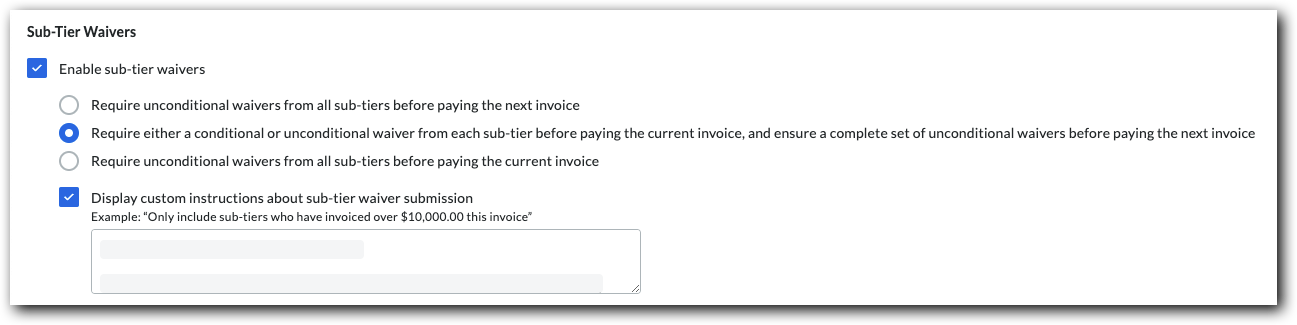
Cochez la case Activer les renonciations de sous-niveaux pour afficher la carte « Sous-niveaux » dans l’onglet « Droits de privilège » des factures de sous-traitant du projet. Décochez la case à cocher pour masquer la carte de sous-niveau.
Dans le cadre de la section Comment les renonciations de sous-traitant devraient-elles être perçues dans le cadre de ce projet ? , vous disposez des options suivantes pour collecter les renonciations signées des sous-traitants :
Les contacts de facturation doivent recueillir les signatures de leurs sous-traitants de niveau inférieur en dehors de Procore. Ensuite, ils téléchargent et soumettent les renonciations signées avec leur facture de sous-traitant pour la période de facturation ouverte . Voir Charger des dérogations de niveau inférieur à une facture de sous-traitant en tant que contact de facturation.