Tutorials

Procore Model Manager - Beta Access & Feedback

The Model Manager (Beta) features and documentation are subject to change without notice. Please be aware that this content is restricted to beta participants and requires a direct link to access.

  • To learn about the beta program, see the Beta Participant Guide.

  • To access the beta and provide feedback Show/Hide Details

    • How to Access: Participating companies must sign the Procore Beta Agreement. Once signed, your Procore Administrator coordinates with your Procore point of contact to enable Model Manager (Beta) on specific Procore projects.

    • How to Provide Feedback During Beta: Contact your dedicated Beta program lead.

    • How to report critical issues: Report breaking changes to Procore Customer Support. For general feedback or non-critical issues, contact your Beta program lead or Procore point of contact.


Currently, only Admin permissions are available. Procore will add more permission levels later.

The Federated Project Model allows you to view multiple 3D models combined into a single, coordinated scene. By viewing your models in the Procore cloud, you ensure your team is always working with the most current information without being limited by local storage capacity or the need to download large files.

Things to Consider

Prerequisites

Steps

Follow these steps to open the federated project model:

  1. Procore shows the contact information from the user's record in the Project Directory.

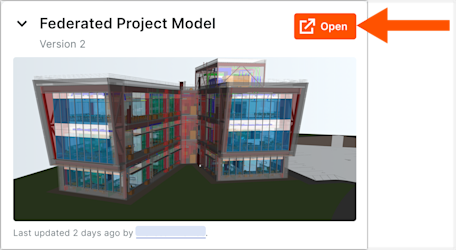
  2. In the Federated Project Model card, click Open.
    This image shows the Open button on the Federated Project Model card on the Admin view of the Model Manager landing page.

Procore opens the latest federated scene directly in the viewer.

Tip

Can I download the federated project model? No. Instead of downloading large files, the system streams optimized data to your device. This cloud-based approach bypasses local storage limits and ensures your team always works with the most current information.


Windows is a registered trademark of Microsoft Corporation in the United States and other countries. Google Chrome, Android, and Google Play are trademarks of Google LLC. iPhone, iPad, and App Store are trademarks or service marks of Apple Inc., registered in the U.S. and other countries and regions. iOS is a trademark or registered trademark of Cisco in the U.S. and other countries and is used under license by Apple Inc. Autodesk, AutoCAD, Civil 3D, Navisworks, and Revit are registered trademarks or trademarks of Autodesk, Inc., and/or its subsidiaries and/or affiliates in the USA and other countries. All other trademarks are the property of their respective owners.