Activer Procore Pay
Étape 1 : Configuration initiale de Procore Pay
Étape 2 : Préparer les paiements
Étape 3 : Test de paiement et clôture du projet
Étape 1 : Configuration initiale de Procore Pay
L’équipe des opérations de paiement de Procore travaille avec les contacts clés et les responsables techniques de votre entreprise pour configurer Procore Pay.
Votre entreprise souhaite utiliser l’environnement Sandbox mensuelde Procore pour tester de nouveaux outils et fonctionnalités ? Les entreprises qui activent Procore Pay doivent demander une configuration supplémentaire pour conserver l’accès à votre Sandbox mensuel. Voir Comment puis-je accéder au Sandbox mensuel de mon entreprise après avoir activé Procore Pay ?
Cliquez ici pour voir les étapes.
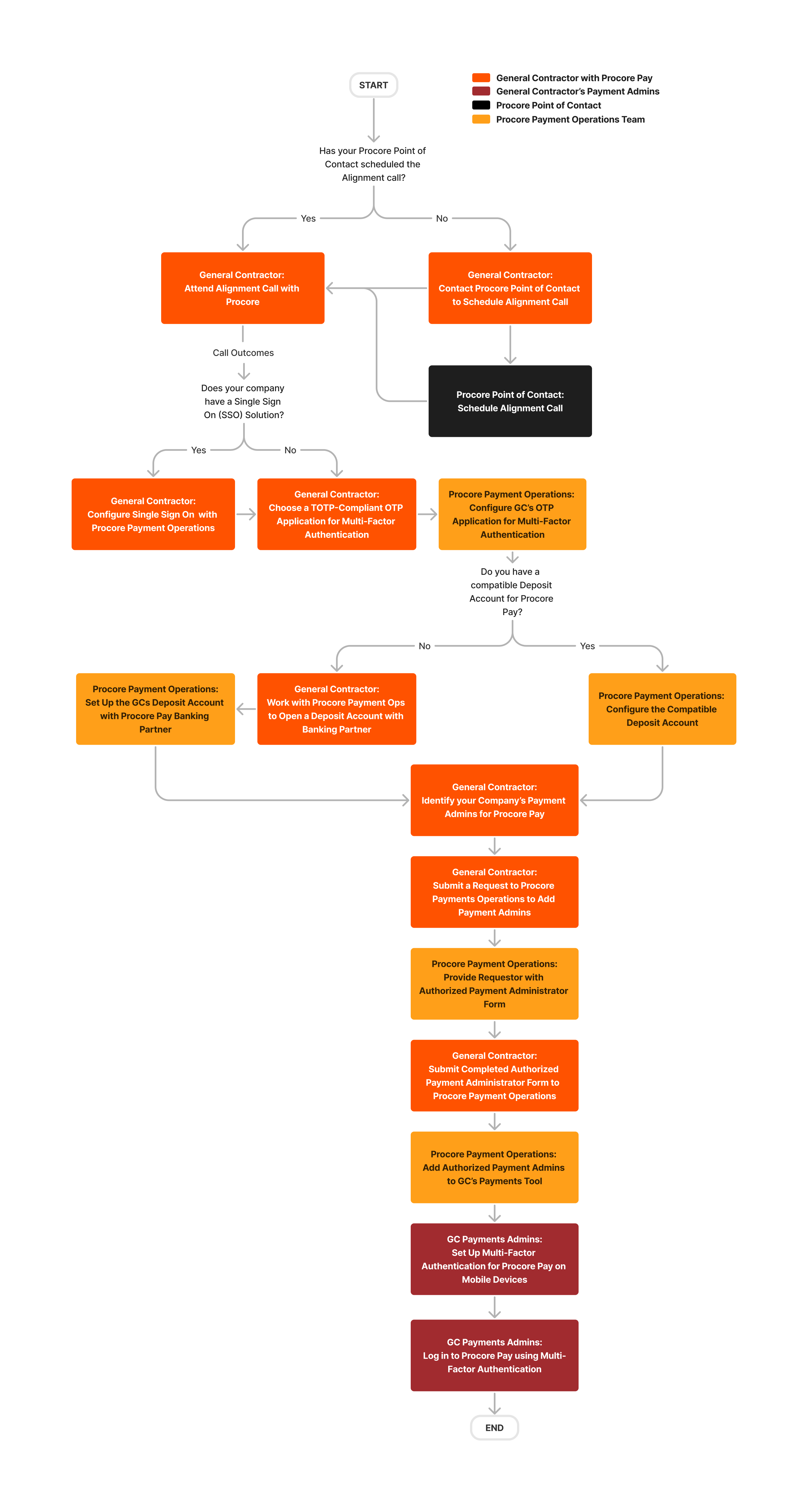
Au cours de la phase initiale, l’équipe Opérations de paiement collabore avec les contacts clés et les responsables techniques de votre entreprise pour activer Procore Pay dans votre compte Procore :
Activation de Procore Pay. L’équipe des opérations de paiement activera Procore Pay dans votre compte Procore. Ils activeront également des fonctionnalités pour les exigences de paiement, les renonciations de privilèges et les outils de gestion des factures.
Configuration de l’authentification unique (SSO). Si vous utilisez une solution d’authentification unique, notre équipe travaille avec vos responsables techniques pour ajuster les paramètres de votre solution afin d’accorder aux membres autorisés de l’équipe l’accès à Procore Pay.
Authentification multifacteur (MFA). Procore Pay exige que les utilisateurs authentifient leur identité via l’authentification multifacteur lorsqu’ils se connectent et avant d’effectuer des transactions financières sensibles. Votre équipe technique devra choisir une application de mot de passe à usage unique conforme à la norme TOTP. Voir Pourquoi l’authentification multifacteur est-elle obligatoire pour Procore Pay et comment fonctionne-t-elle ?
En tant que payeur, vous serez assisté par l’équipe des opérations de paiement dans l’établissement d’un compte de dépôt auprès du partenaire bancaire de Procore et le paramètre de l’accès utilisateur à Procore Pay :
Approbation des accords de partenaires bancaires. Vous devrez remplir des formulaires pour ouvrir un compte de dépôt Procore Pay. Ensuite, nous pouvons initier l’intégration de votre compte de dépôt avec le système bancaire transactionnel. Voir Ouvrir un compte de dépôt pour Procore Pay en tant que payeur.
Soumission du formulaire de Paiement Administrateur autorisée. Ce formulaire permet à notre équipe des opérations de paiement d’accorder l’accès à vos Admins de paiements désignés. Une fois l’opération terminée, nous pouvons accorder aux utilisateurs l’accès à vos Admins de paiement. Voir Ajouter ou supprimer des Admins de paiements en tant que payeur.
Configuration de l’authentification multifacteur pour les Admins de paiement. Après avoir configuré votre solution d’authentification unique, les Admins de paiement autorisés de votre entreprise peuvent configurer l’authentification multifacteur pour Procore Pay sur leurs appareils mobiles. Voir Configurer l’authentification multifacteur pour Procore Pay sur votre appareil et Se connecter à Procore à l’aide de l’authentification multifacteur.
Ce diagramme détaille le flux de travail de configuration initiale de Procore Pay.
Étape 2 : Préparer les paiements
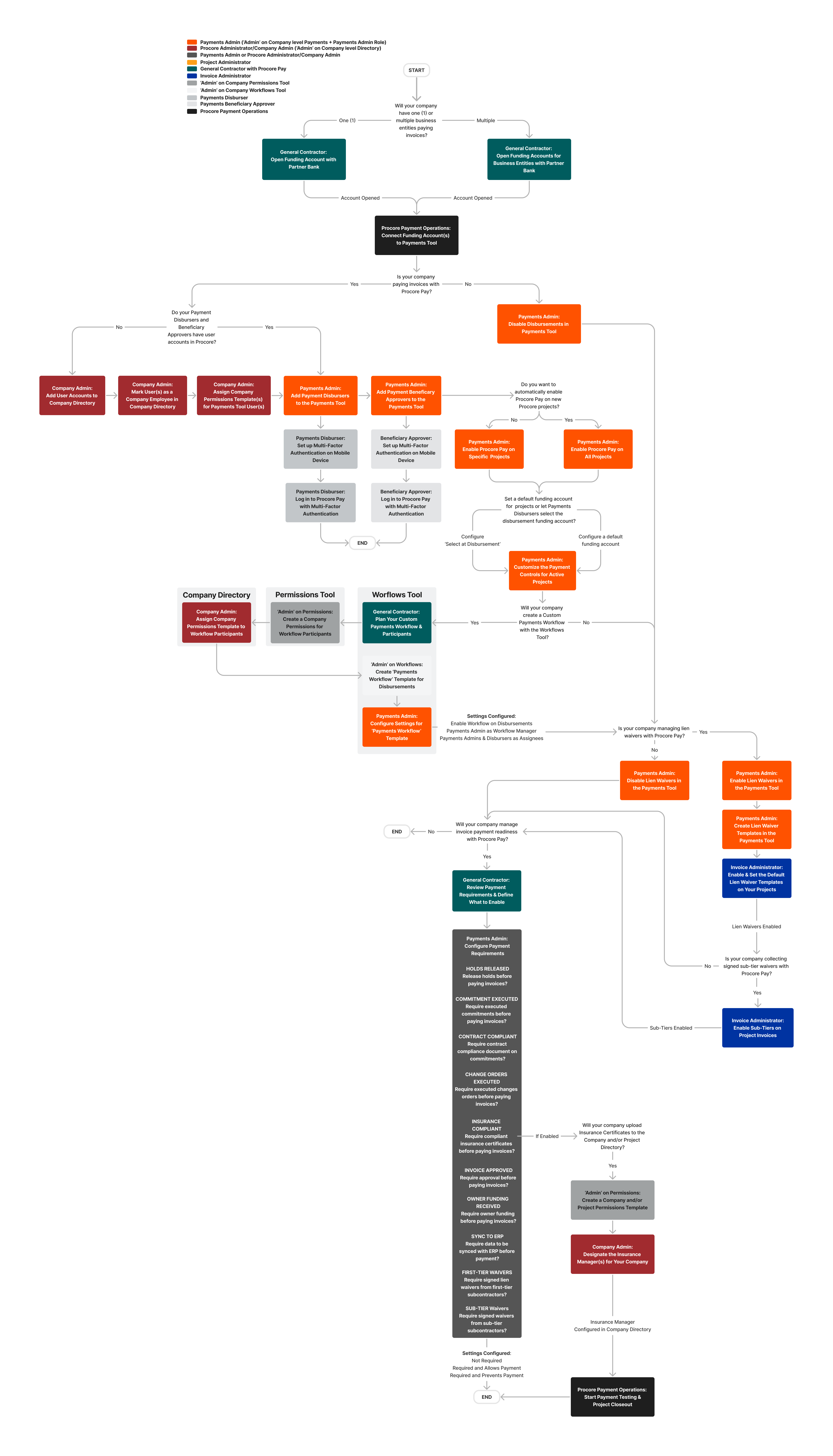
Pour l’étape suivante, Procore affecte un consultant en produits stratégiques pour travailler avec les contacts clés et les membres de l’équipe de votre entreprise afin de gérer votre processus d’implémentation afin que vous puissiez être prêt pour les paiements. Cette phase comprend généralement l’intégration des payeurs et la formation avec votre consultant en produits stratégiques Procore.
Cliquez ici pour afficher le flux de travail d’intégration.
Pour les équipes intéressées par la gestion des exigences de paiement et des suspensions de paiement :
Gérer les retenues de paiement en tant que payeur
Gérer les exigences de paiement
En tant que payeur :
En tant que bénéficiaire :